
Imagine telling a computer “build me a flight tracking website” and then watching as it researches APIs, writes code, tests everything in a browser, and delivers a working application, all while you grab coffee.
That’s not science fiction anymore. That’s Google Antigravity.
Launched on November 18, 2025, alongside Google’s Gemini 3 model, Antigravity represents a fundamental shift in how software gets built.
It’s not just another coding assistant that autocompletes your functions.
It’s an entire development platform where AI agents do the heavy lifting while you act as the architect, making high-level decisions instead of typing every line of code.
The best part? It’s completely free in public preview for Mac, Windows, and Linux users.
Whether you’re a professional developer drowning in repetitive tasks or someone with a great app idea but limited coding skills, Antigravity might just change how you work.
Let’s break down what it is, how it works, and why it’s causing such a stir in the development world.
- What Exactly Is Google Antigravity?
- The Core Idea: From Synchronous to Asynchronous Development
- The Two Faces of Antigravity: Editor vs. Manager
- The Four Core Principles That Make Antigravity Different
- How Google Antigravity Actually Works
- Antigravity vs. The Competition
- Getting Started with Google Antigravity
- Who Should Try Google Antigravity?
- Final Thoughts: Is Antigravity Worth the Hype?
What Exactly Is Google Antigravity?
Google Antigravity is an agentic development platform, which is a fancy way of saying it’s a coding environment where AI agents work autonomously to complete complex software tasks from start to finish.
Think of traditional coding assistants like GitHub Copilot or ChatGPT, they help you write code faster by suggesting the next line or explaining concepts. You’re still doing most of the work.
Antigravity flips that relationship. You become the manager, and AI agents become your development team. You describe what you want to build, and the agents:
- Research necessary APIs and libraries
- Plan the implementation architecture
- Write the actual code
- Test it in a real browser
- Debug issues they find
- Document what they built
- Learn from feedback for next time
All of this happens autonomously, meaning the agents work without you hovering over every decision.
You can even set multiple agents working on different parts of your project simultaneously while you focus on other things.
The Core Idea: From Synchronous to Asynchronous Development
Here’s the traditional way developers work with AI today, you sit in front of your computer, type a prompt, wait for code, review it, copy it into your editor, test it, find issues, go back to the AI, repeat.
It’s synchronous, you and the AI take turns, one step at a time.
Antigravity introduces asynchronous development:
- You give an agent a complex task
- The agent works independently across multiple tools (code editor, terminal, browser)
- You switch to something else or review another agent’s work
- The agent produces “artifacts” (evidence of progress) without interrupting you
- When it’s done (or stuck), it reports back
- You provide feedback, and the agent incorporates it without starting over
This is similar to managing human developers: you don’t watch them type every line. You give them tasks, check in periodically, and review the finished work.
The Two Faces of Antigravity: Editor vs. Manager
Antigravity gives you two distinct working environments, each optimized for different needs:
| View Type | What It Does | Best For | Interface Style |
|---|---|---|---|
| Editor View | Traditional AI-powered IDE with code editor, autocomplete, inline commands, and agent sidebar | Writing code synchronously, making detailed edits, immediate iteration | Familiar developer experience similar to VS Code |
| Manager View | Mission control for orchestrating multiple autonomous agents across different workspaces | Setting up complex tasks, managing parallel workflows, async monitoring | Dashboard-style interface focused on agent oversight |
Editor View is where you write code with AI assistance, similar to what you might know from Cursor or Windsurf.
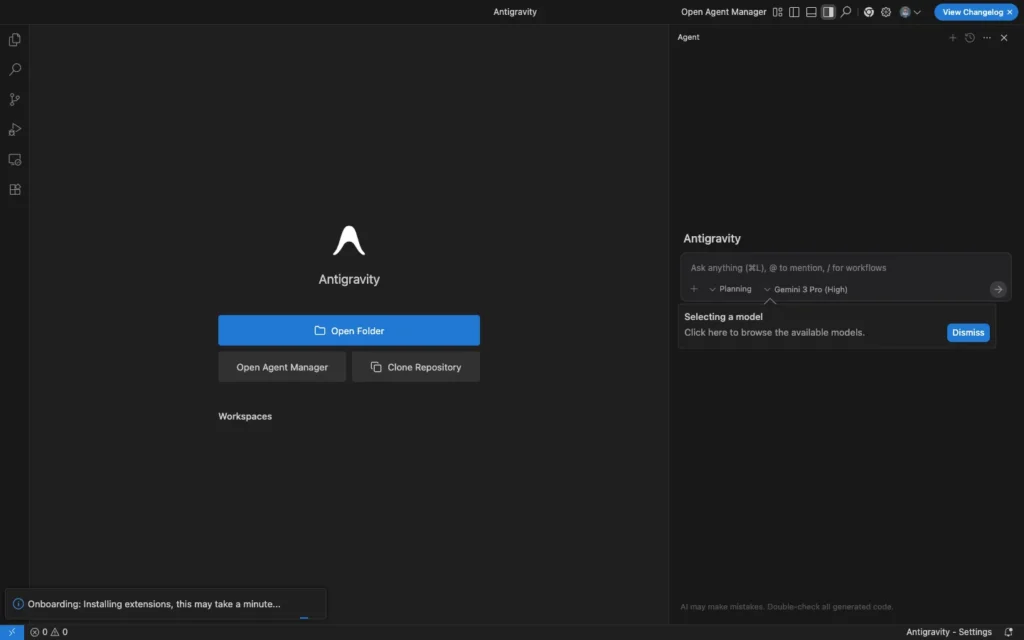
The AI sits in a sidebar, you ask questions, it suggests code, you implement it. This is great for detailed work where you want hands-on control.
Manager View is radically different. Here, agents aren’t embedded in your editor, they’re the main focus. You can:
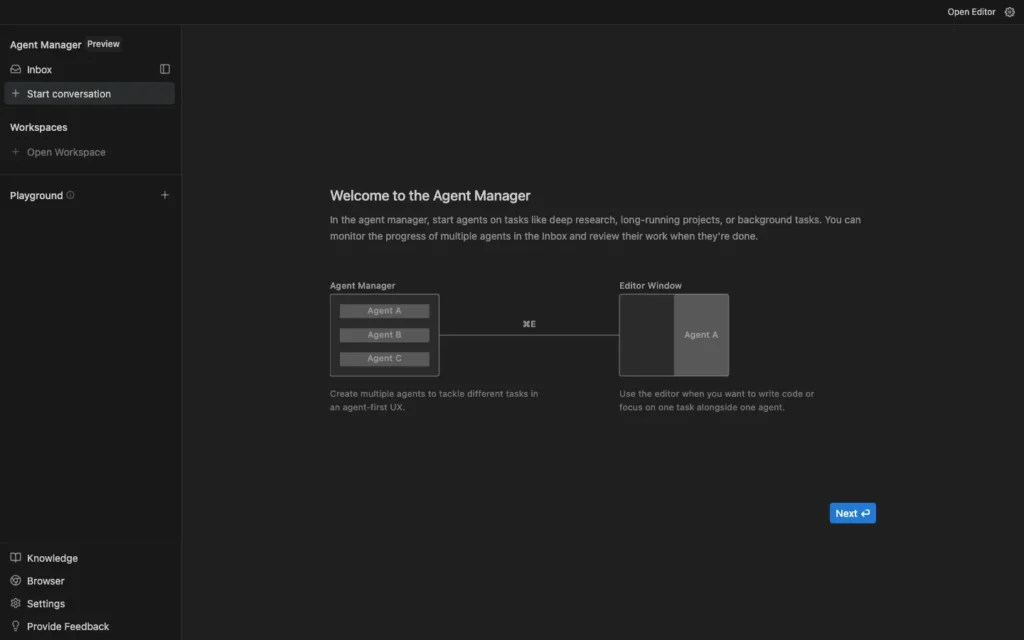
- Spin up multiple agents working on different features simultaneously
- Monitor their progress without interrupting them
- Review artifacts (implementation plans, screenshots, test results) they produce
- Switch instantly between Manager and Editor for any project
- Provide feedback asynchronously without stopping agent execution
Google designed these as separate interfaces because they serve fundamentally different purposes. Cramming both into one window would compromise both experiences.
The Four Core Principles That Make Antigravity Different
Google built Antigravity around four key tenets that set it apart from other AI coding tools:
1. Trust Through Verification
The problem: Most AI coding tools either show you every tiny action (overwhelming) or just dump finished code with no context (can’t verify if it’s correct).
Antigravity’s solution: Agents communicate through Artifacts, tangible deliverables that let you verify work without drowning in details.
What Artifacts look like:
- Implementation plans explaining the approach
- Task lists showing progress step-by-step
- Code walkthroughs highlighting key decisions
- Screenshots of the working application
- Browser recordings demonstrating functionality
- Test results proving quality
Agents don’t just write code, they prove they understood the problem and validated their solution. This builds trust without requiring you to review every line in real-time.
2. Autonomy Across Multiple Surfaces
Traditional AI tools: Embedded in one place (your editor) and limited to that environment.
Antigravity agents: Access to editor, terminal, and browser simultaneously. They can:
- Write code in the editor
- Run commands in the terminal (install packages, start servers, run tests)
- Open Chrome to test the actual application
- Take screenshots and recordings as they work
- Switch between these tools as needed
This multi-surface autonomy means agents can complete entire workflows without constantly asking you to copy-paste between tools or manually run commands.
3. Easy Feedback Without Interruption
The 80/20 problem: An agent completes 80% of a task correctly, but fixing the remaining 20% takes more work than if you’d just done it yourself.
Antigravity’s solution: Asynchronous feedback that gets incorporated automatically.
How it works:
- Leave Google Doc-style comments on text artifacts (“use async/await here instead”)
- Select and comment on screenshots (“this button should be blue, not red”)
- Provide verbal feedback in the chat
- The agent incorporates feedback into its ongoing work without restarting
This turns agents from all-or-nothing tools into genuinely useful assistants that iterate based on your guidance.
4. Self-Improvement Through Learning
Unlike most AI tools that forget everything after each session, Antigravity agents maintain a knowledge base:
What gets stored:
- Code snippets that worked well
- Architecture decisions and why they were made
- Successful approaches to specific types of problems
- Failed attempts and lessons learned
How this helps:
- Agents get better at understanding your preferences over time
- They remember project-specific context between sessions
- Similar tasks get completed faster and more accurately
- Team knowledge compounds instead of being lost
This is closer to how human developers build institutional knowledge than to how current AI tools work.
How Google Antigravity Actually Works
Let’s walk through a concrete example to see the platform in action.
Your goal: Build a flight tracker web application where users enter a flight number and see real-time flight information.
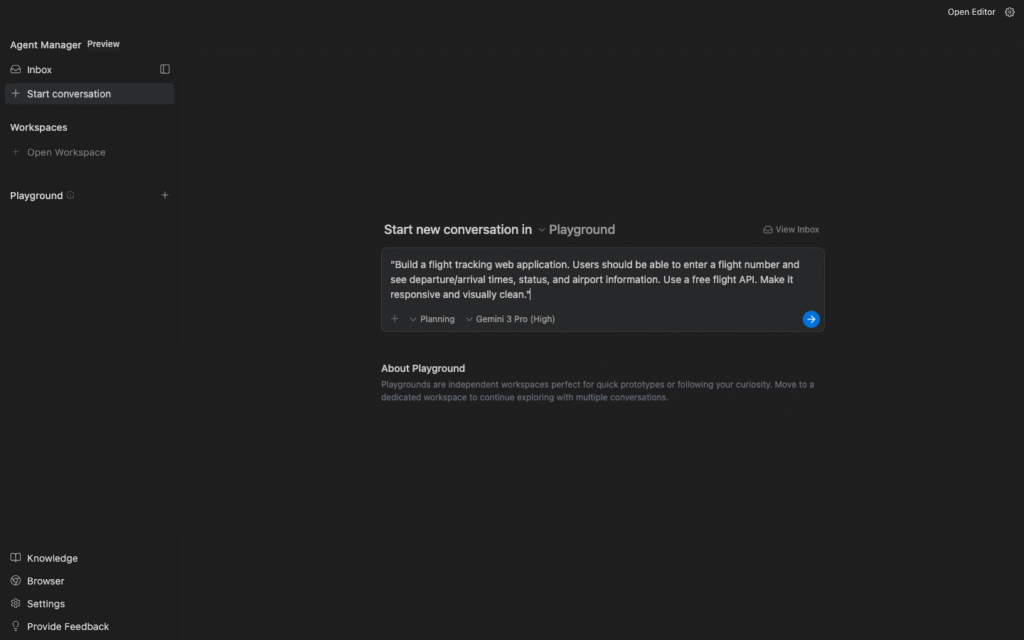
Step 1: Give the Agent a Task
In Manager view, you create a new agent and give it this prompt:
“Build a flight tracking web application. Users should be able to enter a flight number and see departure/arrival times, status, and airport information. Use a free flight API. Make it responsive and visually clean.”
Step 2: Agent Planning Phase
The agent doesn’t immediately start coding. First, it researches and plans:
Artifact 1 – Research Report:
- Searches for available flight APIs
- Compares options (Aviation Stack, AeroDataBox, FlightAware)
- Recommends Aviation Stack (free tier available, good documentation)
- Notes API key requirements and rate limits
Artifact 2 – Implementation Plan:
- Set up basic HTML structure
- Create form for flight number input
- Implement API integration with error handling
- Design responsive UI with flight information display
- Add loading states and error messages
- Test with multiple flight numbers
- Validate across different screen sizes
You review these artifacts and approve (or provide feedback like “use AeroDataBox instead”).
Step 3: Agent Execution
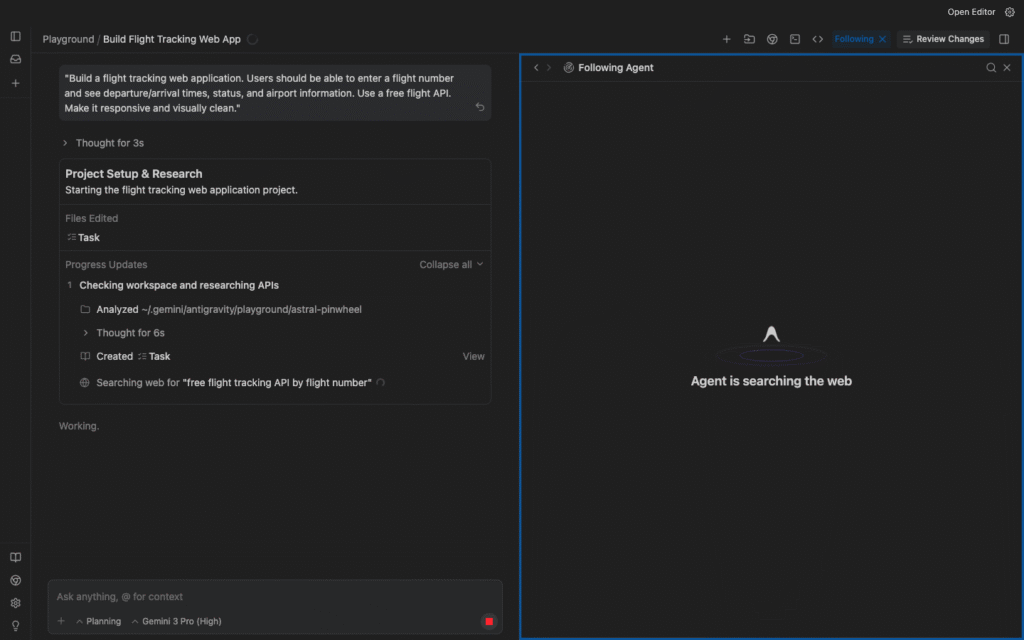
The agent switches to work mode, providing progress updates:
Task 1 ✓ Completed: Created HTML structure with semantic markup
Artifact: Code walkthrough explaining structure choices
Task 2 ✓ Completed: Built input form with validation
Artifact: Screenshot of form in different states (empty, filled, error)
Task 3 ✓ Completed: Integrated Aviation Stack API
Artifact: Terminal output showing successful API test calls
Task 4 ✓ Completed: Designed responsive UI with Tailwind CSS
Artifact: Screenshots at mobile, tablet, desktop sizes
Task 5 ✓ Completed: Added loading animations and error handling
Artifact: Browser recording showing user flow with working and invalid flight numbers
Task 6 ✓ Completed: Cross-browser testing
Artifact: Screenshots from Chrome, Firefox, Safari
Step 4: Your Review and Feedback
You review the artifacts. The functionality works, but you notice:
- The loading spinner is too slow to appear
- Error messages could be friendlier
- You want to add a “recent searches” feature
You leave comments directly on the relevant artifacts. The agent incorporates this feedback without restarting the entire build process.
Step 5: Final Delivery
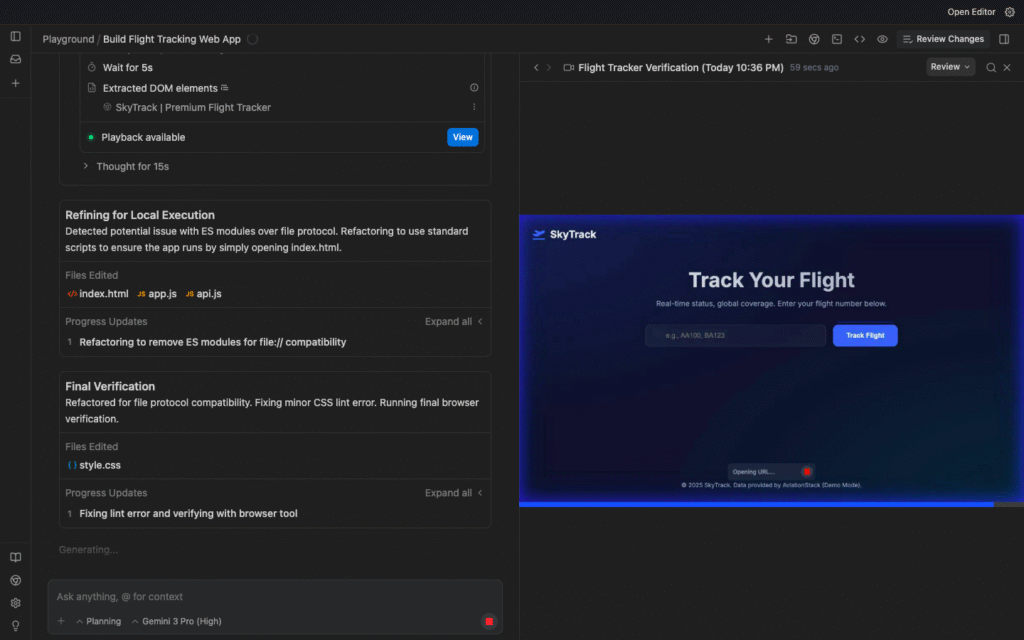
The agent produces a final package:
- Complete working code
- Documentation explaining how to deploy
- List of environment variables needed
- Test results proving quality
Total time: The agent worked for 20-30 minutes while you reviewed artifacts intermittently. Traditional development: 2-4 hours of focused work.
Antigravity vs. The Competition
Antigravity isn’t the only AI coding platform. How does it compare to alternatives?
| Feature | Antigravity | Cursor | Windsurf | GitHub Copilot | Claude Code |
|---|---|---|---|---|---|
| Autonomous Agents | Yes, full autonomy | Limited | Limited | No | Partial |
| Multi-Agent Parallelism | Yes | No | No | No | No |
| Browser Testing | Built-in Chrome control | No | No | No | Limited |
| Visual Artifacts | Screenshots, videos, walkthroughs | No | No | No | Some |
| Async Feedback | Comment on any artifact | Chat only | Chat only | Chat only | Chat only |
| Knowledge Base | Learns project-specific patterns | No | No | No | No |
| Model Options | Gemini 3, Claude 4.5, GPT-OSS | Claude, GPT (varies) | Multiple models | GPT-4 | Claude 4.5 only |
| Pricing | Free (public preview) | $20/month | $10/month | $10-$100/month | $20/month |
| Availability | Mac, Windows, Linux | Mac, Windows, Linux | Mac, Windows, Linux | IDE-dependent | Mac, Windows, Linux |
Key advantages of Antigravity:
- True agent autonomy: Not just chat-based assistance
- Manager view: Designed for overseeing multiple agents
- Visual verification: Screenshots and browser recordings
- Model flexibility: Choose between Gemini, Claude, or GPT
- Free during preview: No cost barrier to entry
Where competitors might still win:
- Maturity: Cursor and Copilot have been refined longer
- IDE integration: Some tools integrate deeper with existing workflows
- Simplicity: Chat-based tools are easier to understand initially
The Windsurf connection: Interesting footnote, Google acquired the Windsurf team (including CEO Varun Mohan) for $2.4 billion in July 2025. That team built Antigravity, which explains visual similarities to Windsurf.
Getting Started with Google Antigravity
Ready to try it? Here’s exactly how to get access:
System Requirements
| Component | Requirement |
|---|---|
| Operating System | macOS, Windows 10/11, or Linux |
| RAM | 8GB minimum, 16GB recommended |
| Storage | 2GB free space for installation |
| Internet | Stable connection required (agents use cloud models) |
Installation Process
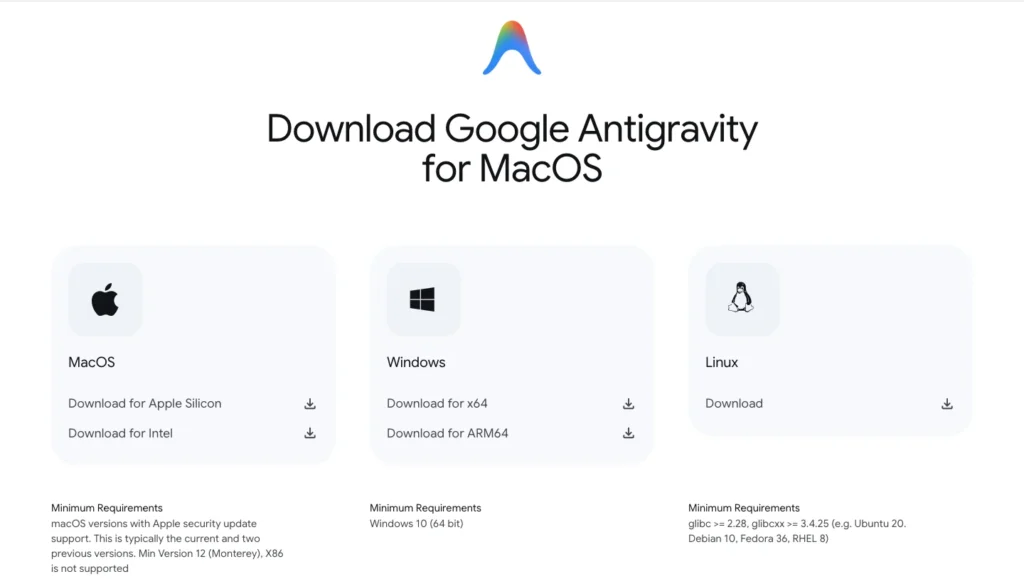
Step 1: Download Antigravity Visit the official Google Antigravity website and download the installer for your operating system.
Step 2: Install and Launch Run the installer. On first launch, you’ll need to sign in with your Google account.
Step 3: Initial Setup Choose your preferences:
- Light or dark mode
- Default AI model (Gemini 3 Pro, Claude 4.5 Sonnet, or GPT-OSS)
- Project directory location
- Terminal shell preferences
Step 4: Create Your First Project Switch to Manager view and click “New Agent.” Give it a simple task like:
“Create a simple to-do list web app with add, complete, and delete functionality. Use local storage to persist tasks.”
Watch as the agent researches approaches, plans implementation, writes code, and tests in the browser.
Understanding Rate Limits
Google offers “generous rate limits” during public preview, but here’s what that means:
Free tier limits:
- Refreshed every 5 hours
- Sufficient for individual developers
- Multiple agents can share the limit pool
What happens if you hit limits:
- Agents pause until the next refresh
- You receive a notification
- No loss of work or context
For heavy users:
- Bring your own API keys (Gemini, Claude, or OpenAI)
- Connect to Google Cloud for enterprise limits
- Paid tiers coming after public preview ends
Who Should Try Google Antigravity?
Definitely try Antigravity if you:
- Spend hours on repetitive coding tasks you wish you could delegate
- Want to build projects faster without compromising quality
- Are curious about the future of AI-assisted development
- Have ideas for apps but limited coding experience (simple projects only)
- Work in frontend development and value visual feedback loops
- Manage complex projects that could benefit from parallel agent execution
- Like being an early adopter of cutting-edge tools (it’s free!)
Maybe stick with current tools if you:
- Need absolute stability and can’t tolerate preview-stage bugs
- Work on projects with extreme IP sensitivity (until enterprise version ships)
- Prefer chat-based assistance over autonomous agents
- Are deeply integrated into another ecosystem (e.g., heavy Cursor power user)
- Need features Antigravity doesn’t have yet (specific language support, certain integrations)
The safe approach: Try Antigravity on a side project or non-critical work. See if the agent-first workflow clicks for you. Keep your existing tools for production work until you’re confident.
Final Thoughts: Is Antigravity Worth the Hype?
Here’s my honest take after researching Antigravity thoroughly:
What’s genuinely impressive:
- The Manager view concept is a real innovation (most competitors don’t have this)
- Visual artifacts and browser testing solve real frontend pain points
- Asynchronous feedback without stopping execution is clever
- Supporting multiple AI models (Gemini, Claude, GPT) gives users choice
- The ambition to reimagine development workflows is commendable
What’s overhyped:
- “Anyone can build anything” claims need significant caveats
- True autonomy is still limited (can’t really walk away for hours yet)
- Early reports suggest execution reliability needs work
- The learning curve is steeper than Google implies
The verdict: Antigravity is a significant step toward agent-first development, but it’s still early days.
It won’t replace senior developers tomorrow, but it might genuinely help them be 2-3x more productive on routine tasks.
For early adopters and developers comfortable with bleeding-edge tools, it’s absolutely worth trying (especially since it’s free).
For teams needing production stability, watch closely but don’t bet the company on it yet.
The most exciting part isn’t what Antigravity can do today, it’s what version 2.0 or 3.0 might do in 12-24 months as agents get better and the platform matures.
If you’ve been waiting for AI to move beyond “fancy autocomplete” into “actual development partner,” Antigravity is the strongest signal yet that we’re heading there.
Download it. Break it. Build something. The future of development is being written in real-time, and you can be part of figuring out what works.
Also Read: