
Look, I’m not going to waste your time with another surface-level overview of ChatGPT Atlas.
If you’re reading this, you want to know exactly how to use this AI browser to solve real problems in your daily work. That’s what this guide delivers.
OpenAI just released ChatGPT Atlas, and here’s what actually matters, this isn’t Chrome with a ChatGPT button. It’s a fundamental rethinking of how you interact with the web.
The browser can see what you’re doing, remember your context, and actually perform tasks for you while you do something else.
So, I have tested it deeply, studied early user experiences, and gathered the most practical ChatGPT Atlas use cases that actually work right now.
Not theory. Not hype.
Just what you can do today to save time and work smarter.
- Understanding the ChatGPT Atlas
- Setting Up Atlas the Right Way
- Use Case 1: Intelligent Memory and Research Retrieval (The End of Lost Tabs)
- Use Case 2: Page and Document Summarization (Read Smarter, Not Harder)
- Use Case 3: Automated Shopping and Ingredient Sourcing
- Use Case 4: Product Comparison and Purchase Research
- Use Case 5: Content Creator's Viral Strategy Assistant
- Use Case 6: In-Line Writing and Email Assistant
- Use Case 7: Market Research and Customer Intelligence
- Use Case 8: Lead Generation and B2B Prospecting
- Use Case 9: Social Media Competitive Analysis
- Use Case 10: Automated Email and Customer Response
- Use Case 11: Study and Learning Enhancement for Students
- Understanding Agent Mode: How It Really Works
- Is Atlas Right for You?
Understanding the ChatGPT Atlas
Before we jump into use cases, let’s get crystal clear on what Atlas actually is and how it works differently from anything you’ve used before.
Atlas is built on Chromium, so it feels familiar if you’ve used Chrome. But the experience is completely different.
When you open a new tab, you’re not looking at a search bar and some bookmark icons. You’re looking at ChatGPT ready to help, with tabs for chat, search links, images, videos, and news all in one interface.
The browser has two main features you need to understand:
1. Browser Memories –
Atlas can remember context from sites you visit and bring that context back later. Not just “you visited this URL on this date” but actual understanding of what you were researching, what products you looked at, what topics you explored.
This means you can ask questions like “Find all the job postings I was looking at last week and create a summary of industry trends” and it actually knows what you’re talking about.
2. Agent Mode –
This is where things get wild. ChatGPT can take control of your browser and complete tasks for you.
It opens tabs, clicks buttons, fills out forms, searches for information, and performs multi-step workflows while you watch or work on something else entirely.
Both features are optional and completely under your control. Now let’s get into exactly how to use them.
Setting Up Atlas the Right Way
First things first. Head to chatgpt.com/atlas and download the browser.
Right now it’s available for macOS, with Windows, iOS, and Android coming soon.
When you open Atlas for the first time, sign in with your ChatGPT account.
Here’s where you make an important decision, do you want to import your bookmarks, saved passwords, and browsing history from Chrome or Safari?
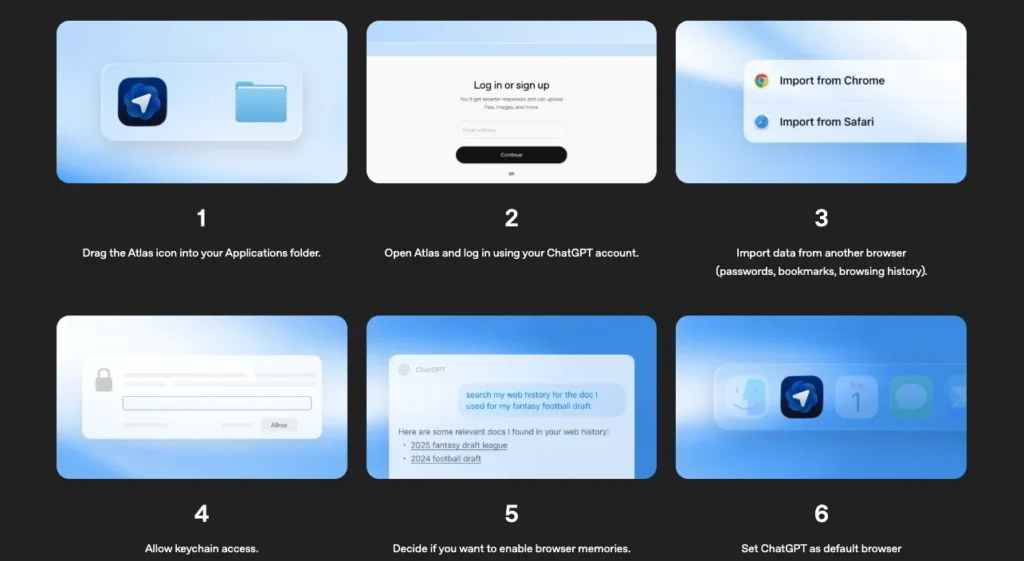
If you import your browsing history, Atlas can immediately start helping you find pages you’ve visited before.
But if you’re privacy-conscious, you can skip this and start fresh.
Privacy Settings You Should Configure Right Now:
Go into settings and decide on Browser Memories.
When this is on, Atlas remembers context from sites you visit to improve responses and suggestions. When it’s off, each session is isolated.
Here’s my recommendation… turn it on, but use the toggle in the address bar to control which specific sites ChatGPT can see.
For sensitive sites like banking or medical records, toggle visibility off. For research, shopping, and general browsing, leave it on.
If you enable Browser Memories, you can view every single memory in settings, archive ones you don’t need anymore, and clearing your browsing history automatically deletes associated memories.
One more critical setting is, by default, Atlas doesn’t use your browsing content to train AI models.
If you want to opt into training, you need to explicitly enable “include web browsing” in data controls. Most users should leave this off.
Now you’re ready to actually use this thing.
Use Case 1: Intelligent Memory and Research Retrieval (The End of Lost Tabs)
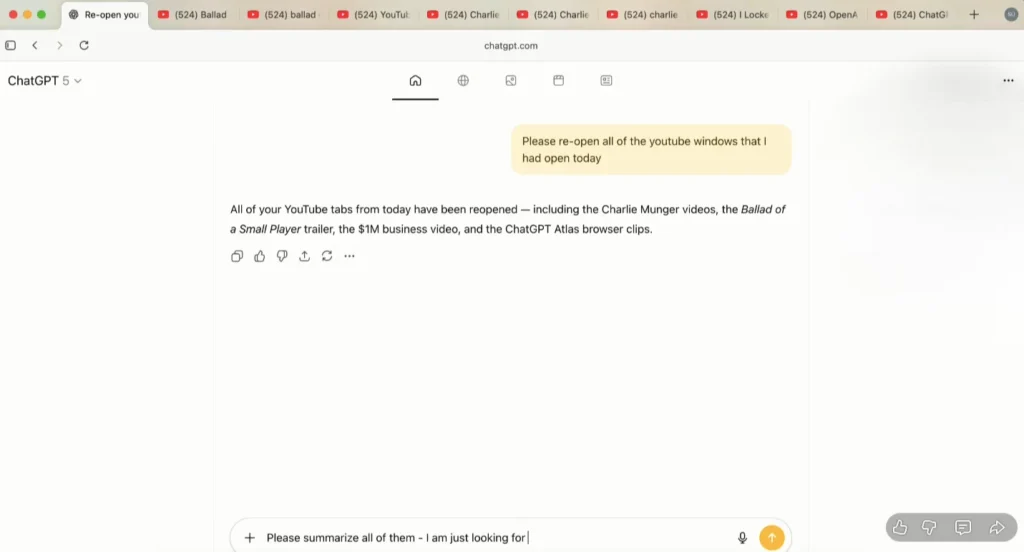
Imagine, You’re researching a topic over several days. You open dozens of tabs, bookmark a few, forget to bookmark others, and eventually lose track of that perfect article or video you saw.
Traditional browser history is useless because you can’t remember the exact title or when you saw it.
How Atlas Solves It? Natural language memory retrieval that understands context, not just keywords.
Step-by-Step Implementation:
Let’s say you spent yesterday researching Gurugram real estate under 80 lacs. You looked at listings, read market reports, watched YouTube videos about the area.
Today you want to continue but you closed everything.
Simply open a new tab in Atlas and type: “Show me all the Gurugram real estate pages I looked at yesterday”
Atlas searches your browsing history with context awareness. It doesn’t just match keywords.
It understands you were researching real estate in Gurugram and surfaces relevant pages even if they didn’t have those exact words in the title.
Advanced Retrieval Prompts:
“Find that video about AI image generation models I watched last week” – Even if you can’t remember the channel or title, Atlas finds it by understanding topic and timeframe.
“Reopen all tabs from my 3D printing research session on Tuesday” – Instant restoration of your entire research context.
“Show me products I looked at on Amazon in the last three days that were under $50” – Filtered retrieval based on price and timeframe.
Practical Tip: At the end of a research session, you can ask Atlas to “Summarize what I researched today and create a to-do list of next steps.” This creates a snapshot you can reference later without keeping tabs open.
This use case alone changes how you handle long-term research projects. No more tab anxiety. No more lost sources.
Use Case 2: Page and Document Summarization (Read Smarter, Not Harder)
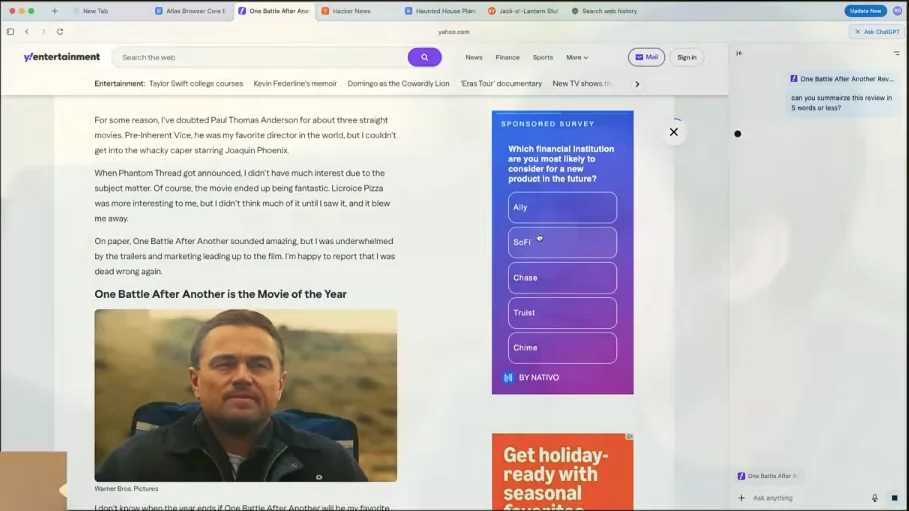
What if you landed on a 5,000-word article, a 40-page PDF, or a long-form blog post. You need the information but don’t have time to read every word. Skimming risks missing key points.
How Atlas Solves It: Context-aware summarization at any depth you need, on any page, instantly.
Step-by-Step Implementation:
You’re on a long article about AI safety research. Click the “Ask ChatGPT” button in the sidebar (or use the keyboard shortcut if you set one up).
The sidebar opens showing ChatGPT already aware of the page you’re on. Now you have options:
Basic Summary: “Summarize this article in 100 words”
Targeted Summary: “What are the three main arguments the author makes about AI safety regulation?”
Simplified Summary: “Explain this at a fifth-grade reading level”
Critical Analysis: “What evidence does the author provide for their claims, and what counterarguments are missing?”
Actionable Summary: “Give me the key takeaways and three action items I should consider based on this”
For PDF Documents:
Atlas handles PDFs beautifully. Open a research paper or any book, report, open the sidebar, and try:
“Create an outline of this paper’s main sections and arguments” “What methodology did the researchers use and what are its limitations?” “Compare this paper’s findings to [paste another source]”
Practical Workflow for Students and Researchers:
- Open 3-5 academic papers in separate tabs
- Use the sidebar on each to get individual summaries
- Then ask: “Compare the methodologies across all open tabs and identify which approach is most rigorous”
- Atlas reads all tabs simultaneously and gives you synthesis, not just summaries
This is how you read 50 pages of material in 10 minutes while actually retaining the important parts.
Use Case 3: Automated Shopping and Ingredient Sourcing
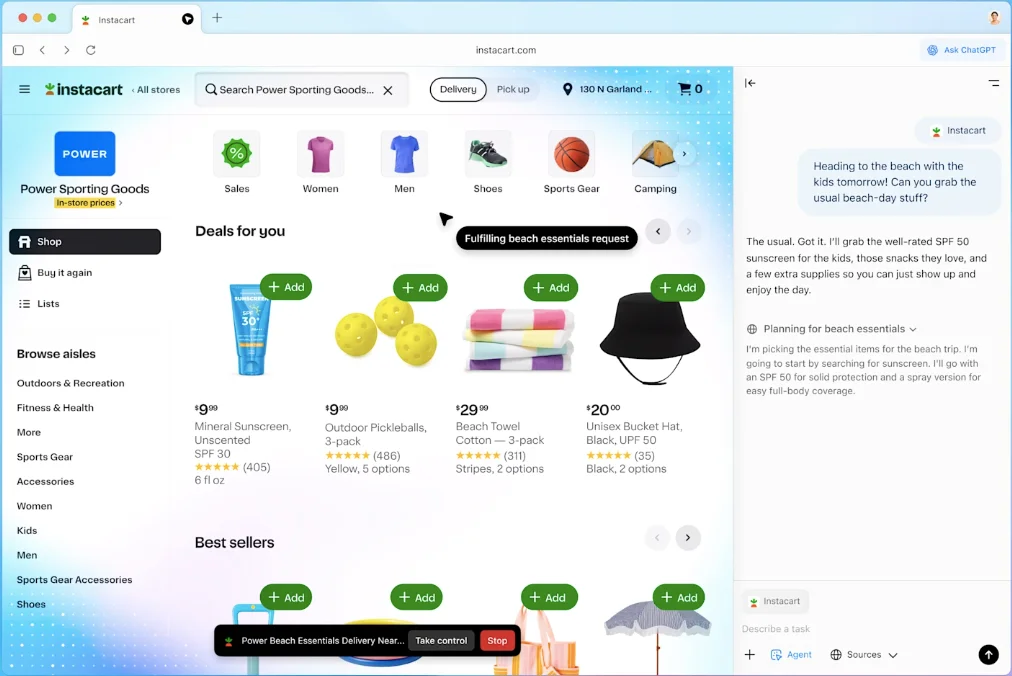
Or Maybe you find a recipe or project that needs specific materials.
Now you spend 30 minutes searching for each item, comparing prices, adding to cart, realizing you added the wrong thing, fixing it, repeating.
How Atlas Solves It: Agent Mode handles the entire shopping workflow while you do something else.
Step-by-Step Implementation:
Let’s walk through a real example that early testers have used successfully.
You find a burrito bowl recipe with ingredients: rice, black beans, corn, salsa, avocado, chicken, lime, cilantro, cheese, tortilla chips.
Copy the recipe and open a new tab in Atlas. Paste the recipe and type:
“Add all ingredients from this recipe to my Walmart cart. Quantities needed for 4 servings.”
Atlas asks: “Should I start Agent Mode to complete this task?” Click yes.
What Happens Next:
Atlas opens Walmart.com, searches for “rice for burritos,” evaluates options, adds the best match to cart. Then searches for black beans, adds those. Continues through the entire list.
If it makes a mistake (like adding popcorn kernels instead of sweet corn), it catches the error, removes the wrong item, and adds the correct one.
When everything is in your cart, Agent Mode stops and shows you the cart for final review. You check prices, quantities, and checkout when ready. Atlas never touches payment information.
Advanced Shopping Use Cases:
“Find the top-rated wireless headphones under $150 on Amazon, compare the top 3 options, and add your recommendation to my cart”
“Search Best Buy for gaming monitors with 144Hz refresh rate and under $300, create a comparison table, and add the best value option to my cart”
Grocery Automation Workflow:
- Keep a running note of meals you want to cook this week
- At the start of the week, give Atlas the meal plan
- Agent Mode compiles ingredients, checks what you already have (if you tell it), and orders everything else
- Your weekly grocery shopping takes 5 minutes instead of an hour
Important Note: Atlas stops at checkout for security. You always complete payment manually. This protects your financial information while still automating the tedious parts.
Use Case 4: Product Comparison and Purchase Research
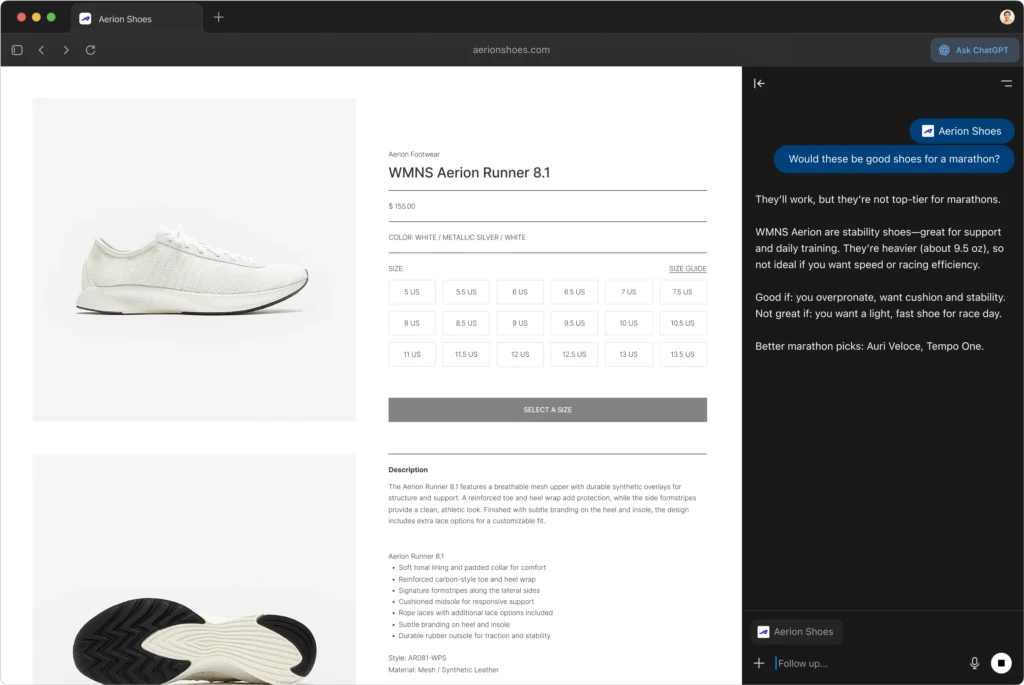
Imagine, you’re shopping for headphones, laptops, or any complex product. You open 10 tabs of reviews, specs, and pricing. Now you’re drowning in information with no clear way to compare.
How Atlas Solves It: Multi-tab analysis with instant comparison tables.
Step-by-Step Implementation:
You’re shopping for wireless headphones. You’ve opened tabs for:
- Sony WH-1000XM5
- Bose QuietComfort Ultra
- Apple AirPods Max
- Reviews on multiple sites for each
Instead of manually noting specs, open a new tab and type:
“Create a comparison table for all the headphones in my open tabs. Include: price, battery life, noise cancellation quality, comfort rating, and warranty.”
Atlas scans every open tab, extracts relevant information from product pages and reviews, and creates a formatted table with everything side by side.
Advanced Comparison Prompts:
“Which headphones have the best value for under $300 based on all open tabs?”
“Summarize the common complaints across all reviews I have open”
“What features do the expensive models have that the cheaper ones don’t? Are they worth the price difference?”
Use Case 5: Content Creator’s Viral Strategy Assistant
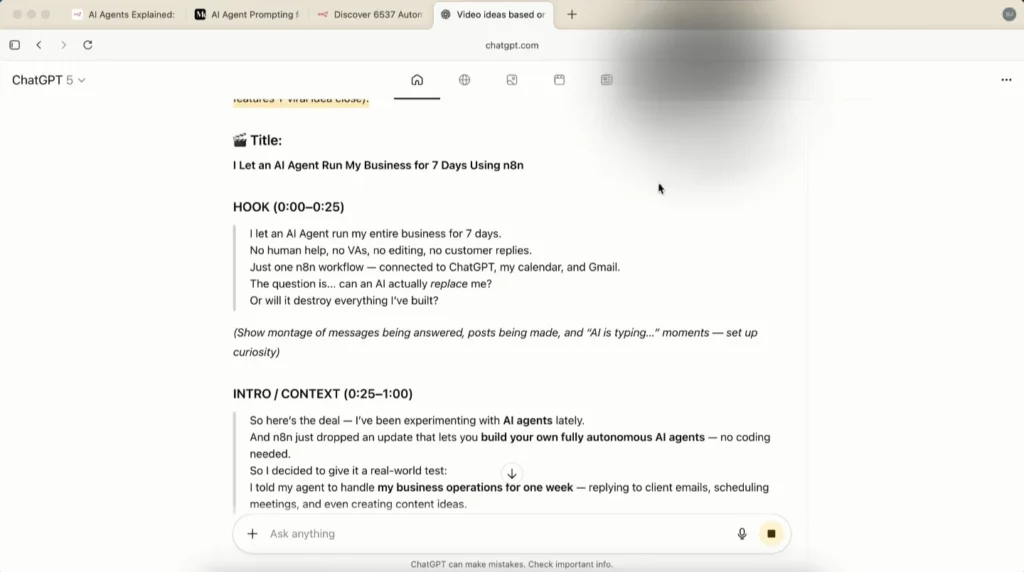
Or Maybe you’re a content creator, creating content for YouTube, Instagram. You need fresh ideas, proven formats, and viral angles. Manually analyzing successful creators takes hours.
How Atlas Solves It: Automated competitive analysis with actionable content ideas.
Step-by-Step Implementation:
Let’s say you run a fitness YouTube channel and need video ideas that will actually perform.
Open your top competitor’s channel (or multiple competitors). In Atlas, use this prompt:
“Analyze the last 20 videos on this channel. Identify: 1) The 5 most viral video topics with view counts, 2) Common emotional patterns in titles and thumbnails, 3) Storytelling structures they use repeatedly, 4) Give me 5 original video ideas based on these patterns but not copying them directly, 5) Write a 30-second video intro script for the best idea.”
What Atlas Delivers:
Atlas watches the channel, processes the videos, and returns:
Top Performing Topics:
- “I tried eating 5000 calories a day for 30 days” – 2.3M views
- “Why everyone is doing this workout wrong” – 1.8M views
- (continues with analysis of each)
Emotional Patterns:
- Titles use “shock + specificity” (exact numbers, timeframes)
- Thumbnails show before/after or extreme reaction faces
- Content balances entertainment with educational value
Your Custom Video Ideas:
- “I followed Arnold’s 1975 workout routine for 60 days – Here’s what happened”
- “The flexibility test 95% of people fail (can you pass?)” (continues with unique ideas)
Sample Script: “You’ve been doing squats wrong your entire life, and it’s destroying your knees. I spent $2,000 on biomechanics analysis to prove it. Here’s what actually works…”
Repurposing Section: Atlas also suggests how to turn each video idea into Instagram Reels, TikToks, and Twitter threads.
Practical Workflow for Content Creators:
- Every Monday, run this analysis on 2-3 top creators in your niche
- Compile ideas into a content calendar
- Use the scripts and structures as starting points
- Create your own unique spin while using proven formats
This transforms vague “I need video ideas” into data-driven content strategy based on what’s actually working.
Use Case 6: In-Line Writing and Email Assistant
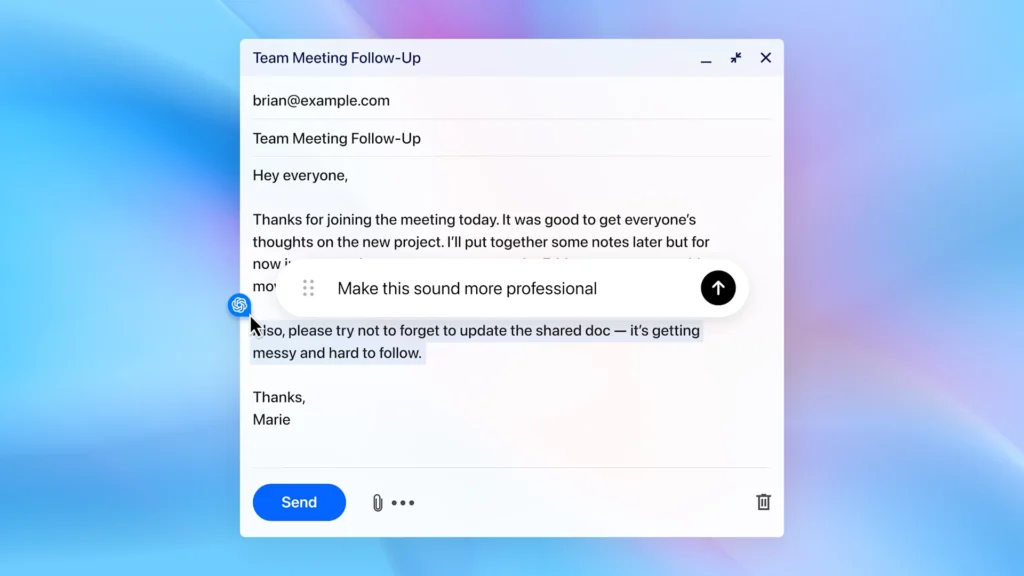
Imagine, you’re writing an email, blog post, or social caption. The tone is off, the grammar needs work, or you’re just stuck. Normally you’d copy text to ChatGPT, get a revision, copy back, and repeat.
How Atlas Solves It: ChatGPT comes with you into any text field on any website.
Step-by-Step Implementation:
You’re composing a professional email in Gmail responding to a client request. The email feels too casual. Here’s what you do:
- Highlight the email text you’ve written
- Right-click and select “Ask ChatGPT” (or use your keyboard shortcut)
- The sidebar opens with your selected text
Now give commands like:
“Make this more professional while keeping it warm” “Fix grammar and improve clarity” “Rewrite this as a confident but not pushy sales response” “Make this email shorter while keeping the key points”
Atlas shows you the revised version. If you like it, click “Replace text” and it updates directly in Gmail. No copying and pasting.
Real Example – Google Docs Integration:
You’re writing a blog post in Google Docs. You’ve written a paragraph explaining a complex concept but it’s confusing. Highlight the paragraph and ask:
“Explain this concept more clearly using a real-world analogy”
Atlas rewrites it with a concrete example that makes the idea instantly understandable. Click replace, keep writing.
Social Media Workflow:
Writing an Instagram caption, highlight your draft, ask: “Rewrite this in my usual energetic but authentic style.”
Because Atlas has browser memory, it references your past conversations and content to match your actual voice.
Email Automation for Customer Support:
If you’re responding to customer emails, you can create templates with Atlas. For each common question type, have Atlas draft professional responses that you quickly personalize before sending.
Pro Tip: The more you use this feature, the better Atlas gets at understanding your writing style. After a few weeks, it starts suggesting rewrites that genuinely sound like you.
Use Case 7: Market Research and Customer Intelligence
Or Mabybe you’re launching a product or service. You need to understand what your target market actually wants, how they talk about their problems, and what offers will resonate.
Traditional research is slow and expensive.
How Atlas Solves It: Automated research across Reddit, X (Twitter), YouTube comments, and forums to find real customer language.
Step-by-Step Implementation:
Let’s say you’re launching a productivity app for freelancers. You need to understand their actual pain points.
Open Atlas and activate Agent Mode with this prompt:
“Research productivity struggles for freelancers. Search Reddit communities, X posts, and YouTube comments. Find the top 10 pain points people explicitly mention. Include actual quotes, the sentiment behind each issue, and how frequently it appears. Compile into a structured document.”
What Agent Mode Does:
- Searches relevant Reddit communities (r/freelance, r/productivity, etc.)
- Scans recent Twitter conversations about freelancer productivity
- Reads YouTube comments on freelancer productivity videos
- Extracts patterns and quotes
- Creates a Google Doc with organized findings
Why This Matters:
You now have real customer language to use in your marketing, not your assumptions. Your headlines, ad copy, and product positioning can mirror how your audience actually describes their problems.
Advanced Application:
Run this research monthly to track how market sentiment changes, what new pain points emerge, and which solutions competitors are offering. Stay ahead of trends instead of reacting to them.
Use Case 8: Lead Generation and B2B Prospecting
Imagine, you need leads for your B2B service. Buying generic lists gives you outdated contacts. Manual research takes forever and you still don’t know if companies are actively looking for solutions.
How Atlas Solves It: Automated lead scraping that targets companies showing active buying signals.
Step-by-Step Implementation:
Let’s say you offer automation consulting and want to find companies that need your help right now.
Activate Agent Mode with this prompt:
“Search ZipRecruiter and LinkedIn for companies actively hiring receptionists, administrative assistants, or data entry clerks in the last 30 days. These companies have manual processes we can automate. For each company, collect: company name, website, decision-maker LinkedIn profile, company Instagram if available, phone number, and industry. Create a Google Sheet with all findings.”
What Happens:
Atlas opens job sites, searches for the specific roles, identifies companies posting those positions, visits company websites to gather contact information, finds decision-makers on LinkedIn, and compiles everything into a spreadsheet.
You get a list of qualified leads who are literally expressing demand for efficiency solutions right now by hiring more people to do manual work.
Why This Works:
A company hiring receptionists is a company drowning in manual processes. They’re telling you they need help without realizing it. Your outreach can position automation as a better alternative to hiring.
Outreach Template (Also Created by Atlas):
“Saw you’re hiring administrative staff. What if you could handle 80% of that workload with automation instead? Here’s how companies in [their industry] are doing it…”
Advanced Lead Generation:
You can target any signal:
- Companies posting about hiring challenges on social media
- Businesses announcing expansion (they’ll need solutions)
- Companies in industries you specialize in hitting certain revenue milestones
- Organizations posting about specific pain points you solve
Practical Workflow:
- Run lead generation every Monday morning
- Atlas delivers 20-30 qualified leads while you make coffee
Spend your day on high-value outreach and closing, not research
Use Case 9: Social Media Competitive Analysis
My favourite use case, imagine, you want to grow on Instagram, LinkedIn but don’t know what content actually works in your niche.
Manually analyzing competitors means scrolling forever and taking scattered notes.
How Atlas Solves It: Complete competitive analysis with engagement patterns, content strategies, and actionable recommendations.
Step-by-Step Implementation:
You’re growing a fitness brand on Instagram. You know a few competitors killing it but don’t understand their strategy.
Open their Instagram profiles in separate tabs, then use this prompt with Agent Mode:
“Analyze these 3 fitness influencer profiles. For each, identify: posting frequency, peak posting times, most engaging content types (Reels vs. carousels vs. photos), caption length and style, hashtag strategy, engagement rate by post type, and common themes in high-performing posts. Create a Google Sheet comparing all three and recommend a strategy for my new fitness account.”
Atlas’s Analysis:
Opens each profile, scrolls through recent posts (you may need to log in for full access), tracks patterns, measures engagement, and creates a comprehensive comparison.
Profile Analysis:
Influencer A:
- Posts 5x per week, primarily 8-10 PM EST
- Reels get 3x more engagement than static posts
- Captions are 50-75 words, conversational, ending with questions
- Uses 10-15 hashtags, mix of broad and niche
- Top themes: “debunking fitness myths” and “form checks”
Influencer B:
- Posts 7x per week, primarily 6-8 AM EST
- Carousel posts perform best, showing transformation stories (continues with detailed analysis)
Recommended Strategy for You:
- Post Reels 4x per week at 8 PM focusing on myth-busting and form
- Use 12-15 hashtags: [specific recommendations]
- Carousel posts 2x per week showing before/after with story elements
- Captions should end with engagement questions
Advanced Application:
Run this analysis monthly to track what’s changing. If Reels performance drops and carousels rise, adjust your strategy immediately. You’re making data-driven decisions instead of guessing.
You Can Earn Money by Offering This as a Service:
Business owners are using Atlas to offer social media audits as paid services. Charge $500-1000 for a comprehensive competitive analysis that used to take a week and now takes two hours.
Use Case 10: Automated Email and Customer Response
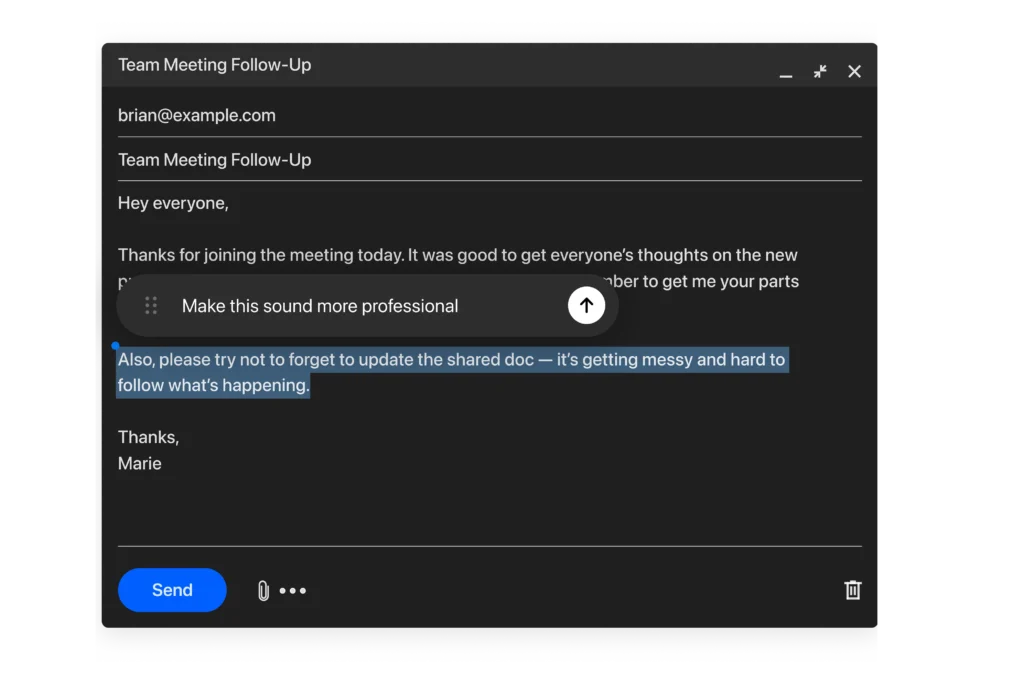
Now imagine, you get 30-50 customer emails daily. Many are similar questions. Crafting individual responses eats up 2-3 hours every day.
How Atlas Solves It: Context-aware email drafting that references previous conversation threads.
Step-by-Step Implementation:
You open your Gmail inbox and see a customer asking about product features, delivery time, and return policy.
Click into the email thread, open the ChatGPT sidebar, and prompt:
“Draft a professional response to this email. Reference their specific questions, maintain a helpful tone, and include relevant information from our support documentation.”
If you have past conversations with this customer, Atlas can reference them: “This customer previously asked about product durability. Acknowledge their past concern in this response.”
What You Get:
A complete email reply that:
- Answers each question directly
- Matches your brand voice
- References past context if relevant
- Includes appropriate next steps
You review, add any personal touches, and send. What took 10 minutes now takes 2.
Template Creation Workflow:
For common questions (pricing, shipping, refunds), have Atlas create response templates you can quickly customize:
“Create a template for responding to pricing questions that explains our tiers, emphasizes value, and ends with scheduling a demo call.”
Save that template, and now every pricing question gets answered in 30 seconds.
Advanced Customer Service:
For complex support issues, Atlas can:
- Summarize long email threads so you understand the situation quickly
- Suggest solutions based on similar past issues
- Draft responses that de-escalate frustrated customers
- Identify when an issue needs human escalation vs. automated response
Practical Measurement:
One entrepreneur reported cutting email response time from 3 hours daily to under 1 hour, freeing up 10 hours per week for revenue-generating activities.
Use Case 11: Study and Learning Enhancement for Students
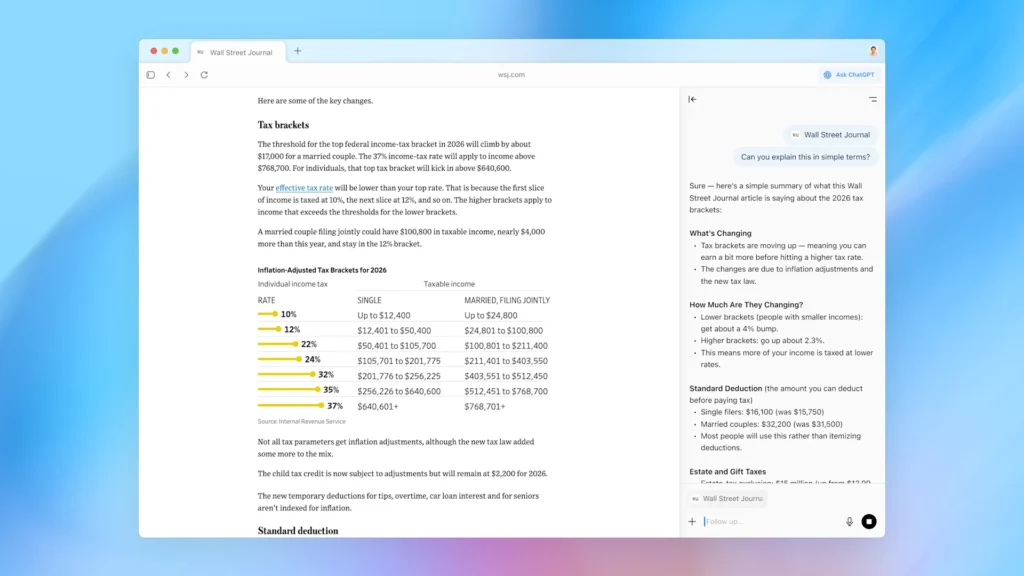
If You’re studying for exams. Lectures are passive. Textbooks are dense. You need active learning techniques but creating practice questions and summaries takes too long.
How Atlas Solves It: AI-powered active learning that turns any content into practice questions, simplified explanations, and custom study materials.
Step-by-Step Implementation:
You’re in an online lecture about neuroscience. The professor explains how neurons transmit signals. You want to test your understanding immediately.
While watching, click the ChatGPT sidebar and type:
“Create 5 practice questions about this content: 2 basic recall questions, 2 application questions, and 1 analysis question that requires deep understanding.”
Sample Output:
Recall Questions:
- What are the main parts of a neuron and their functions?
- What chemical process occurs at the synapse?
Application Questions: 3. If a neurotransmitter is blocked from binding to receptors, what would happen to signal transmission? Explain your reasoning. 4. How would increased sodium channel density affect action potential speed?
Analysis Question: 5. Compare electrical and chemical synapses. Under what conditions would each type be more advantageous for neural communication?
You test yourself immediately, reinforcing learning while the material is fresh.
For Reading Dense Textbooks:
You’re reading a chapter on organic chemistry. It’s 40 pages of complex reactions. Use Atlas:
“Explain this chapter as if I’m learning it for the first time. Use everyday analogies and break down each concept step by step.”
Atlas transforms academic language into understandable explanations using real-world comparisons.
Multi-Source Study Sessions:
You have lecture slides, textbook chapters, and YouTube explanations all open in tabs. Ask:
“Synthesize all these sources into a comprehensive study guide highlighting where they agree, where they differ, and what concepts I need to focus on most.”
Atlas creates a unified study document that shows you exactly what to prioritize.
Exam Preparation:
One week before exams:
- Open all your study materials in tabs
- Ask Atlas to create a comprehensive review guide
- Have it generate 50 practice questions at varying difficulty
- Use those questions to identify weak areas
- Ask Atlas to explain weak areas in different ways until they click
This systematic approach to exam prep happens in hours instead of days.
Understanding Agent Mode: How It Really Works
Let’s get detailed about Agent Mode since it powers many of these use cases.
What Agent Mode Actually Does:
When you activate Agent Mode, ChatGPT takes control of your cursor and keyboard within the browser. It can:
- Open and close tabs
- Click buttons and links
- Fill out forms with information
- Scroll and navigate pages
- Search for content
- Extract and compile data
- Create documents based on findings
What It Cannot Do:
This is important for safety:
- Run code in your browser console
- Download files to your computer
- Install browser extensions
- Access other apps outside the browser
- Access your computer’s file system
- Complete payment transactions
How to Activate Agent Mode:
Method 1: Ask a question that requires multi-step action. Atlas will ask “Should I start Agent Mode to complete this?” Click yes.
Method 2: Click the Agent Mode button before entering your prompt to start it immediately.
Watching Agent Work:
When Agent Mode runs, you see your browser working in real-time. Tabs open, searches happen, forms fill. This transparency is intentional so you know exactly what’s happening.
When Agent Pauses:
For sensitive sites (banking, financial institutions), Agent Mode automatically pauses and asks you to supervise. This prevents it from taking actions with your money without explicit permission.
Logged Out Mode:
You can run Agent Mode while logged out of ChatGPT. This limits what it can access and reduces risk, useful for sensitive research or when you want extra privacy.
Stopping and Correcting:
If Agent makes a mistake or heads in the wrong direction, you can stop it at any time, give corrective instructions, and restart. It’s collaborative, not autonomous.
Security Considerations:
Agent Mode can be vulnerable to hidden malicious instructions on compromised websites. OpenAI has built safeguards, but no system is perfect. Best practices:
- Monitor Agent’s actions when possible
- Use logged-out mode for sensitive tasks
- Don’t give Agent access to financial sites
Be cautious about which websites you let Agent interact with
Is Atlas Right for You?
Here’s my honest assessment after extensive testing and research.
Atlas is genuinely valuable if you:
- Do lots of online research that requires synthesizing multiple sources
- Create content and need competitive intelligence and ideas
- Run a business requiring lead generation and market research
- Manage customer emails or communications at scale
- Study or learn topics that benefit from AI-powered active learning
- Shop online frequently and hate the manual process
- Want to delegate routine browser tasks to automation
Atlas probably isn’t worth it yet if you:
- Need rock-solid reliability for mission-critical work
- Rely heavily on Chrome extensions that don’t work in Atlas
- Require advanced bookmark organization
- Value privacy above all else and don’t want AI seeing your browsing
- Primarily browse on mobile or need cross-platform consistency
- Do specialized work requiring tools Atlas doesn’t support
Atlas won’t replace your main browser this year. But for specific workflows, it delivers immediate, measurable time savings.
The question isn’t “should I switch to Atlas completely?” It’s “which of my repetitive, time consuming tasks should Atlas handle?”
If you can identify even two or three use cases where Atlas saves you 30+ minutes per week, that’s 2+ hours monthly. Over a year, that’s a full work week you’ve reclaimed.
The Future Potential:
What makes Atlas exciting isn’t just what it does today, but where it’s heading. AI browsers represent a fundamental shift in how we interact with the web.
Today you click and type. Tomorrow you describe what you want accomplished and AI handles the execution.
Atlas is an early step toward that future. It’s imperfect but improving rapidly with frequent updates.
My Recommendation:
Download Atlas. Dedicate one week to testing it with real work tasks using this guide. Track actual time savings. Then decide if the value justifies adding another tool to your workflow.
Don’t overthink it. The ones moving fastest to adopt AI-driven automation are positioning themselves to win as the landscape shifts, whether Atlas ends up being the winner or not.
Learning how to work with AI agents is the skill that matters, and Atlas is one of the best places to develop that skill right now.
Try it. Break it. Figure out where it fits your work. That’s the only way you’ll know if it’s right for you.
Also Read: