
If you’ve already started using Google Omni, you’ve probably noticed that the quality of your output depends entirely on how you write your prompts.
Two people can use the exact same tool, but one gets cinematic results while the other gets mediocre footage.
The difference? How they prompt.
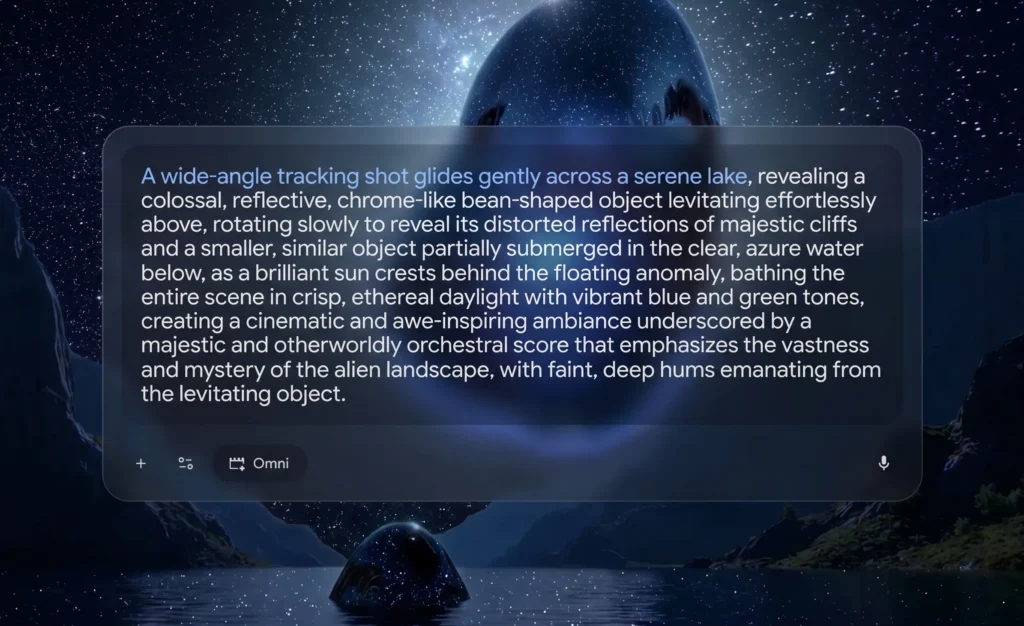
This guide gives you everything you need to write Google Omni prompts that actually work.
Practical frameworks, real examples you can copy, and professional techniques that deliver results.
- Why Google Omni Prompts Are Different
- The Prompt Framework: 5 Core Elements
- Advanced Prompting Techniques
- Ready-to-Use Prompt Library
- Cinematic & Film Prompts
- Product & Commercial Prompts
- Social Media & Lifestyle Prompts
- Anime & Stylized Animation Prompts
- Educational & Scientific Prompts
- Image-to-Video Prompts
- Editing & Remix Prompts
- 8 Essential Prompt Engineering Tips
- Practice Makes Perfect
Why Google Omni Prompts Are Different
Here’s the thing: Google Omni isn’t like older video generators where you needed to describe every tiny detail. Omni has world knowledge, understands physics, and can reason across multiple inputs.
With Veo (the previous tool), you had to be extremely prescriptive. With Omni, you tell it what you want to create, and the model’s reasoning brings the details to life.
But that doesn’t mean vague prompts work. You still need structure. You just don’t need to over-explain.
Also Read: How to Use Google Omni for AI Video Generation [12 Prompts]
The Prompt Framework: 5 Core Elements
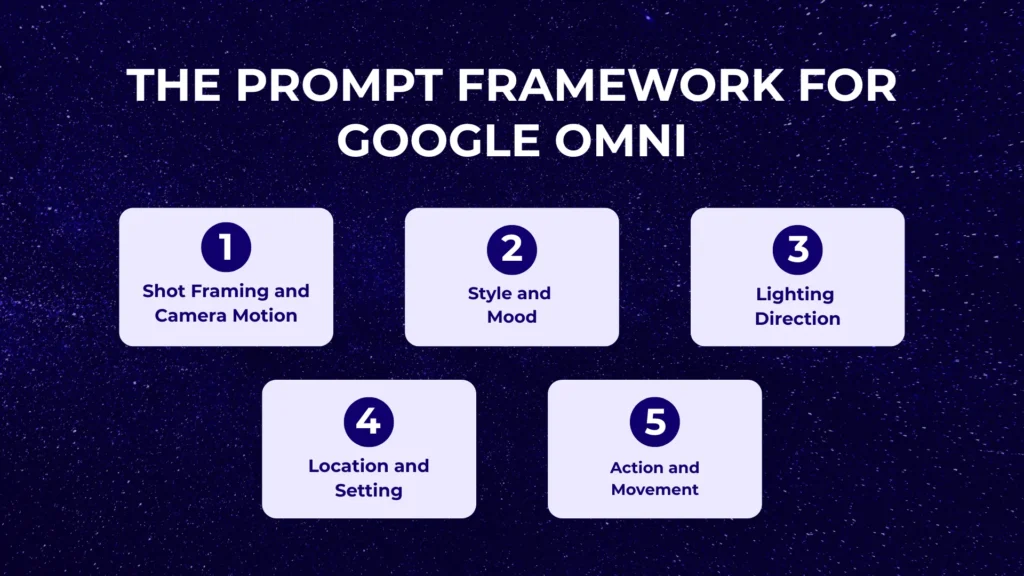
Every effective Google Omni prompt uses some combination of these five elements. The more detail you add, the more control you have over the final output.
1. Shot Framing and Camera Motion
How do you want to frame your shot, and how should the camera move?
Framing Options:
- Wide-angle (shows entire scene)
- Medium shot (waist up for people, partial for objects)
- Close-up (face or detail focus)
- Extreme close-up (macro detail)
Camera Movement:
- Static/Locked off/Fixed: No camera movement at all
- Dolly-in/Push in: Camera moves toward the subject
- Pull back: Camera moves away, revealing more
- Dolly zoom: That Vertigo effect where subject stays same size but background changes
- Pan: Camera rotates left or right
- Tilt: Camera rotates up or down
- Crane/Aerial: Camera moves up and over
- Oner/Continuous shot: No cuts, one seamless take
Example: “Close-up shot of a coffee cup, camera slowly pushes in, shallow depth of field”
2. Style and Mood
How should your scene feel? Realistic or stylized? Grounded or dramatic?
Style Options:
- Realistic, photorealistic
- Cinematic, filmic
- Majestic, epic
- Dreamy, ethereal
- Gritty, raw
- Minimalist, clean
- Whimsical, playful
Film Reference Shortcuts: Instead of describing a complex look, reference films:
- “Blade Runner-inspired color palette” (teal and orange, neon-soaked)
- “Wes Anderson style” (symmetrical, pastel colors, centered framing)
- “BBC nature documentary quality” (epic, patient, beautiful)
- “Apple-style minimalism” (clean, white, soft reflections)
Example: “Cinematic 4K quality with subtle lens flare, dreamy atmosphere, warm color grade”
3. Lighting Direction
Lighting transforms mood more than almost anything else.
Light Sources:
- Sun, golden hour, sunset
- Streetlamp, neon signs
- Off-screen lighting, studio lights
- Natural window light
- Candlelight, firelight
Light Quality:
- Crisp, sharp (creates hard shadows)
- Warm (amber, cozy tones)
- Ethereal, soft (diffused, gentle)
- Harsh (high contrast, dramatic)
- Moody, dark (low-key lighting)
- Bright and saturated (vibrant, energetic)
Example: “Soft morning light creating warm tones, backlit with golden glow, shallow depth of field”
4. Location and Setting
Where is your scene set? You don’t need to describe every detail—Omni fills in context based on your overall intention.
Examples:
- “An alien landscape with clear, azure water”
- “Rain-soaked back alley in Shinjuku at 2 AM”
- “Bustling Michelin-starred kitchen”
- “Sunlit minimalist apartment”
- “Dense neon Tokyo skyline at night”
Notice: each description gives Omni enough context to understand the mood and visual characteristics without micro-managing every element.
5. Action and Movement
What’s happening? Who are the characters and objects? How are they moving and interacting?
Be Specific About:
- What subjects are doing
- How they’re moving
- Interactions between elements
- Emotional states or expressions
Example: “A red fox emerging from morning mist in a meadow, moving slowly and cautiously, ears twitching”
Advanced Prompting Techniques
Now that you understand the framework, let’s get into professional techniques that separate good prompts from great ones.
Using Cinematography Vocabulary
Professional film terms give Omni precise direction:
Lens Types:
- “35mm anamorphic film” (wide cinematic look with characteristic lens flares)
- “Macro lens” (extreme close-up detail)
- “Natural smartphone zoom” (realistic phone camera aesthetic)
- “Film camera aesthetic” (grain, organic feel)
Aspect Ratios:
- 16:9 (standard horizontal video)
- 9:16 (vertical for social media)
- 21:9 (ultra-wide cinematic)
- 4:3 (classic TV/film ratio)
- 1:1 (square for Instagram)
Frame Rate:
- 24fps (cinematic, slight motion blur)
- 30fps (smooth, standard video)
- 60fps (very smooth, sports/action)
Text Rendering in Videos
Omni handles text better than most video models. You can specify:
- Typography: Font style, weight, size
- Placement: Centered, top-third, bottom, corner
- Animation: Fade in, slide up, typewriter effect
- Integration: How text syncs with visuals
Example: “Add bold white text saying ‘Welcome’ that fades in at 2 seconds, centered, with a subtle drop shadow”
Directing Camera Movements
Use professional videography terms for precise camera control:
Continuous Shots: “One continuous shot” or “oner” tells Omni you want no cuts
Specific Angles:
- “Static” or “locked off” = no movement
- “Fixed” = tripod-mounted stability
- “Handheld” = natural camera shake
Movement Types:
- “Push in” or “punch in” = move toward subject
- “Dolly zoom” = that famous Jaws effect
- “Crane up” = camera rises vertically
- “Dutch tilt” = tilted angle for drama
Camera Types:
- “Steadicam” = smooth walking shot
- “Drone shot” = aerial perspective
- “POV” = first-person perspective
- “Webcam style” = static, straight-on, amateur aesthetic
Ready-to-Use Prompt Library
Here are tested prompts organized by category. Copy these and adjust them for your specific needs.
Cinematic & Film Prompts
1. Rain-Soaked Urban Night Scene
Prompt:
35mm anamorphic film, rain-soaked back alley in Shinjuku at 2 AM, neon kanji signage reflecting in puddles, a lone woman in a translucent vinyl raincoat walks toward camera holding a clear umbrella, slow dolly-in from low angle, shallow depth of field with bokeh streetlights, steam rising from a ramen stall in the background, authentic 35mm grain, cool teal shadows with warm magenta highlights, 8 seconds, 24fps, no captions, no watermark
Why This Works: Specific location (Shinjuku), exact time, detailed visual elements, camera movement, lighting description, technical specs.
2. Epic Aerial Landscape Reveal
Prompt:
Aerial drone shot beginning tight on a lone surfer paddling on glassy water at golden hour, slow upward pull-back and rotate revealing 800-foot Big Sur sea cliffs, ribbons of mist clinging to the rock face, soft volumetric god rays, photorealistic, cinematic color grade, 10 seconds, smooth gimbal motion, no jitter
Why This Works: Starts with specific framing (tight on surfer), describes camera movement (pull-back and rotate), includes scale (800-foot cliffs), atmospheric details (mist, god rays).
3. Cyberpunk Subway Interior
Prompt:
Low-angle tracking shot through a futuristic Tokyo subway car at night, holographic ads flickering on the windows, a hooded protagonist with cybernetic eyes sits in the foreground, train lights strobe across her face as the camera slowly pushes in, depth of field racks from background passengers to her glowing pupils, Blade Runner 2049 color palette, anamorphic lens flares, 8 seconds, 1080p
Why This Works: Film reference (Blade Runner 2049), specific camera technique (rack focus), atmospheric elements (holographic ads, strobing lights).
4. Slow-Motion Product Detail
Prompt:
Extreme macro slow-motion at 1000fps, a single red strawberry plunging into a glass of milk, crown-shaped splash freezing mid-air, soft north-facing window light, white seamless background, hyper-detailed water droplets, photoreal, 6 seconds, square 1:1 framing
Why This Works: Technical specification (1000fps), exact lighting direction (north-facing window), specific framing (1:1 square).
5. Symmetrical Stylized Scene
Prompt:
Wes Anderson style, perfectly symmetrical wide shot of a pastel-pink hotel lobby, two bellhops in matching mustard uniforms stand frozen at attention either side of a brass elevator, the elevator doors slide open in unison, a tiny dog wearing a bow tie trots out toward camera, slow dolly-in, flat lighting, ornate wallpaper, 4:3 aspect ratio, 7 seconds
Why This Works: Clear style reference, perfect symmetry described, character details, aspect ratio specified for authentic Wes Anderson look.
Product & Commercial Prompts
6. Tech Product Showcase
Prompt:
A smartphone rotating on a clean white surface, soft reflections, studio lighting, 360 product showcase with subtle shadow movement, Apple-style minimalism, 6 seconds, 1:1 aspect ratio
Application: Perfect for product launches, e-commerce listings, social media ads.
7. Beverage Commercial Hero Shot
Prompt (with reference image of your product bottle):
Use the attached bottle as the hero product, maintain exact label and shape. Generate a premium drink commercial: 0–2s ice cubes tumble in slow motion through black background, 2–4s liquid splash forms around the bottle as it lands center frame, 4–6s droplets bead on glass and slowly run down, dynamic rim lighting, brand color glow accent, ends on a still hero shot with empty space top-right for a tagline. 6 seconds, 9:16, photorealistic, no text generated.
Why This Works: Timestamp structure (0-2s, 2-4s, 4-6s), reference image for product accuracy, space reserved for text overlay.
8. Skincare Routine Aesthetic
Prompt (with reference image of product):
Soft, clinical skincare ad using the attached serum bottle. Macro close-ups intercut: dropper releasing a single golden drop, drop landing on a glass surface, hands gently massaging serum into porcelain skin, bottle rotating slowly under diffuse overhead light. Pale beige and ivory palette, gentle ambient piano, 8 seconds, 1:1.
Application: Instagram ads, TikTok product showcases, premium brand content.
9. High-Energy Sneaker Reveal
Prompt (with reference sneaker image):
High-energy sneaker reveal using the attached shoe. Black studio, smoke swirls around the floor, sneaker descends from above on an invisible mount and lands with a soft impact kicking up dust, light rays sweep across it, slow 270° camera orbit hero shot at the end. Maintain exact colorway and material detail of the reference. 7 seconds, 9:16, aggressive bass-heavy audio cue at the impact frame.
Why This Works: Drama (smoke, dust, light rays), specific camera movement (270° orbit), audio direction included.
Social Media & Lifestyle Prompts
10. Instagram Product Spin
Prompt:
A sneaker spinning mid-air against a gradient background transitioning from electric blue to hot pink, sharp product photography lighting, seamless 360 rotation, 6 seconds, 9:16 vertical format
Application: Instagram Reels, TikTok product showcases, Amazon listings.
11. Cozy Morning Routine Vlog
Prompt:
Slice-of-life morning routine in a sunlit minimalist apartment, no faces shown above the shoulders. Series of natural moments: linen curtains billowing, espresso machine pulling a shot, slippers crossing a wood floor, a hand opens a journal and writes, steam rises from an oat-milk latte. Soft beige and cream palette, natural window light, gentle ambient room sounds, 12 seconds, 9:16.
Why This Works: No faces (privacy-friendly), specific aesthetic (minimalist, beige/cream), natural sound included.
12. Travel B-Roll Package
Prompt:
Documentary travel B-roll, Uluwatu Bali at sunrise: surfers paddling out silhouetted against orange horizon, drone reveal over breaking waves onto limestone cliffs, close-up of dewdrops on frangipani flower, hands wax-rubbing a longboard, woman in linen wrap walking down wooden steps to the beach. Multiple short clips edited as one continuous mood reel, golden warm grade, ambient ocean and bird sounds, 15 seconds, 16:9, 24fps.
Application: YouTube vlogs, Instagram travel content, destination marketing.
13. First-Person POV Experience
Prompt:
First-person POV walking through a Bangkok night market, handheld natural sway, vendors flame-grilling skewers on the left, lantern strings glowing overhead, steam billowing from noodle pots, motorbikes weaving past, camera occasionally drifts down to a hand carrying a paper plate of pad thai. Real ambient market chatter, sizzling, music bleed. 12 seconds, 9:16, 30fps.
Why This Works: Immersive POV, sensory details (sizzling, chatter), handheld natural movement.
Anime & Stylized Animation Prompts
14. Studio Ghibli Countryside
Prompt:
Studio Ghibli style hand-painted animation, a young girl in a yellow sundress runs through a sunlit field of tall grass, hair and dress flowing behind her, dandelion seeds float through the air, fluffy clouds drift across a deep blue sky, the camera pulls back to reveal a wooden farmhouse in the distance. Soft pastel palette, gentle orchestral score, 10 seconds, 16:9, traditional cel-animation aesthetic.
Application: Animated explainers, nostalgic content, artistic projects.
15. 90s Anime Transformation
Prompt:
Late-90s shōnen anime aesthetic, dramatic transformation: a teenage hero stands on a cliff, wind whipping his hair, energy aura begins to glow blue around him, ground cracks, debris floats upward, he yells skyward, lightning streaks across the storm clouds, his hair shifts to gold in a final freeze-frame pose. Hand-drawn linework, speed-line streaks, cel-shaded color, 8 seconds, 4:3.
Why This Works: Era-specific (90s shonen), technical anime terms (cel-shaded, speed-lines), aspect ratio for authenticity.
16. Cyberpunk Anime City
Prompt:
Anime in the style of Satoshi Kon's "Paprika": dense neon Tokyo skyline at night, camera floats forward between skyscrapers, holographic koi fish swim through the air, rain falls upward in slow motion, a girl in a red coat stands on a rooftop watching it all, her scarf trailing in the wind. Painterly backgrounds, vivid saturated palette, dreamlike pacing, 10 seconds, 21:9 cinemascope.
Application: Music videos, artistic content, experimental projects.
Educational & Scientific Prompts
17. Photosynthesis Visualization
Prompt:
Scientifically grounded 3D animation of photosynthesis inside a single plant cell. Sunlight photons stream into a chloroplast, water molecules split, oxygen bubbles released, glucose molecules assemble. Clean educational style, soft volumetric light, labels appear in clean sans-serif as each step occurs (CO₂ → O₂, H₂O, glucose). 12 seconds, 16:9, narration-ready pacing with natural pauses.
Application: Educational YouTube, online courses, science communication.
18. Astronomy Education
Prompt:
Accurate astronomical visualization, Earth and Moon orbiting their barycenter, accelerated 30-day time-lapse, photoreal planet textures, tidal locking shown by a small marker on the Moon's near side, starfield background with subtle parallax, smooth slow camera rotation. 10 seconds, 16:9, scientifically accurate motion.
Why This Works: Scientific accuracy specified, educational pacing, clear visual markers.
19. Physics Concept Demonstration
Prompt:
Educational gravitational-lensing visualization. Camera drifts toward a Schwarzschild black hole, background starfield warps around an event horizon, photon sphere becomes visible, accretion disk appears tilted, light from a galaxy behind the hole bends into a perfect Einstein ring as we approach. Photoreal sci-vis style, no UI overlay, 12 seconds, 21:9.
Application: Physics education, science communication, explainer videos.
Image-to-Video Prompts
These prompts work when you upload a reference image and want to animate it.
20. Portrait Animation
Upload: Portrait photo of a person
Prompt:
Using the attached image as the first frame, animate the subject with subtle natural motion: gentle breathing, slight hair movement from a soft breeze, eyes blink twice with realistic timing, micro-expression shift from neutral to a faint smile, camera holds locked-off, 5 seconds, photorealistic, do not change facial structure or clothing
Application: Social media content, profile videos, creative portraits.
21. Painting Comes to Life
Upload: Any classical painting
Prompt:
Treat the attached painting as a living scene. Animate elements naturally within the original brushstroke style — clouds drift, foliage sways, water ripples, fabric moves with the wind, any animals breathe. Camera performs a slow 5% push-in. Preserve the original color palette, lighting, and painterly texture. 8 seconds, 16:9.
Why This Works: Preserves artistic style while adding life, subtle camera movement enhances depth.
22. Product 360° Rotation
Upload: Product photo on clean background
Prompt:
Use the attached product image as the subject. Generate a 360° turntable rotation with smooth deceleration on the front-facing pose. Studio softbox lighting, gentle bloom on glossy highlights, soft contact shadow on a seamless background. Match exact product geometry, label, and color. 6 seconds, 1:1 aspect ratio, no morphing or warping.
Application: E-commerce, product pages, social media showcases.
23. Pet Photo to Anime
Upload: Photo of a pet
Prompt:
Convert the attached pet photo into a cel-shaded anime snapshot, then animate it as if it were a clip from a Studio Ghibli film. The pet looks toward camera, ears twitch, tilts its head curiously, blinks, soft wind ruffles fur. Hand-painted background of a sunlit meadow with floating dandelion seeds. Maintain the pet's exact coat colors and markings. 6 seconds, 16:9.
Application: Creative pet content, personalized gifts, social media.
Editing & Remix Prompts
These are follow-up prompts after your first generation to modify existing videos.
24. Mood and Time Change
Prompt:
Keep everything the same but make it golden hour instead of midday, warmer color temperature, longer shadows, soft volumetric god rays through the window.
Application: Adjusting lighting mood without regenerating entire video.
25. Season Swap
Prompt:
Change the season to deep winter without altering any camera movement or subject motion. Replace all foliage with snow-covered bare branches, add a thin layer of snow on every horizontal surface, breath mist visible on exhale, overcast diffuse light replacing direct sun, desaturated cool color grade. Keep all characters and objects identical.
Why This Works: Specific about what changes (season) and what stays the same (motion, subjects).
26. Cinematic Color Grade
Prompt:
Apply a professional teal-and-orange cinematic color grade to the entire clip. Push shadows toward teal-green, warm skin tones and highlights toward amber-orange, reduce overall saturation by 15%, add subtle film grain and very slight vignette. Do not alter timing, framing, or subject motion.
Application: Making existing footage look more cinematic without reshooting.
27. Style Transfer
Upload: A stylized art piece as reference
Prompt:
Re-render the previous clip in the visual style of the attached image — match its color palette, brush texture, and lighting language. Preserve the original motion, framing, and subject identity exactly.
Application: Applying artistic styles to realistic footage.
28. Background Replacement
Prompt:
Same subject, same lighting on the subject — but replace the background with a snowy mountain ridge at dusk. Add gentle snowfall in front of and behind the subject for parallax depth. Match the new background's color cast onto the rim light of the subject's face.
Why This Works: Maintains subject consistency while completely changing environment.
29. Add Weather Effects
Prompt:
Add heavy rainfall to the existing scene without altering any subject motion or framing. Streaks of rain fall at a 10° angle in the foreground and midground, puddles form on the ground and show ripple rings, wet sheen on all surfaces, slightly desaturate and cool the color temperature by 500K. Rain should look photorealistic, not composited.
Application: Adding atmosphere to existing footage.
30. Slow Motion Remix
Prompt:
Apply a 2× slow-motion effect to the entire clip. Add subtle motion blur on fast-moving elements, slightly boost color saturation to compensate for the reduced temporal energy, keep the first and last frames as freeze-frame holds for 0.5 s each.
Application: Creating dramatic emphasis on existing action.
8 Essential Prompt Engineering Tips
Here are professional techniques that consistently improve results:
1. Lead with Cinematography Vocabulary
Specify lens type (35mm, anamorphic, macro), camera movement (dolly-in, crane, Steadicam, locked-off), and lighting (golden hour, volumetric, hard rim).
Why: Professional terms give Omni precise visual targets instead of vague descriptions.
2. Structure as Subject → Motion → Camera → Mood
Keep each layer explicit. Omni follows multi-clause prompts reliably when organized clearly.
Example:
- Subject: “A red fox”
- Motion: “emerging from morning mist”
- Camera: “slow dolly-in, shallow depth of field”
- Mood: “BBC nature documentary quality, soft golden backlight”
3. Anchor Identity with Reference Images
For any character or product, attach a reference and write: “use the attached image as the subject, preserve face/label/colorway exactly.”
Why: Reference images ensure consistency and accuracy far better than text descriptions alone.
4. Use Explicit Durations and Timestamps
Break longer prompts into time blocks: “0–4s wide shot, 4–8s push-in, 8–12s close-up”
Why: Gives Omni a clear edit structure to follow, especially for multi-scene sequences.
5. Specify Aspect Ratio In-Prompt
Even if you set it in settings, mention “9:16 vertical” or “21:9 cinemascope” in the text.
Why: Redundancy ensures the correct format, especially for social media content.
6. Use Negative Cues
Add phrases like “no captions,” “no watermark,” “no morphing” to suppress common artifacts.
Why: Explicitly stating what you don’t want prevents unwanted elements.
7. For Consistency Across Scenes, Repeat Identity
Write “same woman in the same red coat” in each scene block rather than assuming Omni will remember.
Why: Explicit repetition maintains character/object consistency better than implied reference.
8. For Edits, Isolate What’s Changing
Write “Keep everything identical except…” rather than re-describing the entire scene.
Why: Tells Omni exactly what to preserve versus what to modify, reducing errors.
Practice Makes Perfect
Here’s the reality: your first few prompts probably won’t be perfect. That’s normal.
The key is iteration. Generate, review, identify what worked and what didn’t, then adjust your prompt. Google Omni’s editing capabilities make this fast, you don’t need to start from scratch each time.
My Recommendation:
- Start with one of the ready-to-use prompts from this guide
- Generate and see what you get
- Use editing prompts to refine (change lighting, swap backgrounds, adjust mood)
- Note what prompt structures gave you the best results
- Build your own prompt library based on what works for your specific needs
The prompts in this guide are your foundation. Modify them, combine techniques, experiment with different styles. The more you prompt, the better you’ll understand what language produces the results you want.
Prompt writing is a skill. Treat it like one. Practice, iterate, and improve.
Now go create something amazing.
Also Read: