
Let’s be honest, finding the right visual inspiration can eat up way more time than it should.
Endless scrolling through Pinterest, saving random images to folders, trying to explain to your team what’s in your head.
It’s tedious, and it takes up a chunk of every project.
Google Labs just released something called Mixboard that takes a different approach.
Instead of spending hours hunting down the perfect reference images, you just describe what you’re picturing, and it generates a whole mood board for you using AI.
Powered by Gemini 2.5 Flash model and the newly released Nano Banana image editing technology, Google Mixboard represents Google’s direct answer to Pinterest, Adobe Firefly Boards, and manual moodboarding workflows that have dominated creative work for decades.
The cool part? It’s completely FREE right now.
You just need a Google account, and you’re good to go.
No design skills required, no credit card, nothing fancy.
Let’s walk through how it actually works.
- What Exactly Is Google Mixboard?
- The Technology Behind Mixboard: Gemini 2.5 Flash + Nano Banana
- Who Should Use Google Mixboard? (The Real Use Cases)
- How to Access Google Mixboard?
- Step-by-Step Guide: Creating Your First Mixboard
- 15 Practical Use Cases for Google Mixboard
- Is Google Mixboard Worth Using? The Honest Assessment
What Exactly Is Google Mixboard?
Mixboard is an experimental, AI-powered concepting board designed to help you explore, expand and refine ideas, according to Google’s official announcement.
But what does that actually mean in practice?
Traditional moodboarding workflow:
- Spend hours searching Pinterest, Instagram, design sites
- Screenshot or save dozens of reference images
- Import everything into Canva, Figma, or PowerPoint
- Manually arrange images into cohesive layouts
- Add text annotations explaining connections
- Total time: 3-8 hours per mood board
Mixboard AI workflow:
- Type a description of what you want to visualize
- AI generates 10-15 custom images matching your concept
- Iterate using natural language commands (“more like this,” “make it darker”)
- Combine, edit, or regenerate any element instantly
- Share or download final board
- Total time: 10-30 minutes per mood board
Instead, users can start their own project using text prompts to have AI fill in the ideas, eliminating the need to have an established image collection to pull from.
Mixboard doesn’t help you organize existing images, it creates entirely new visuals tailored specifically to your concept.
The Technology Behind Mixboard: Gemini 2.5 Flash + Nano Banana
Understanding what powers Mixboard helps explain why it feels different from other AI image tools:
| Component | What It Does | Why It Matters |
|---|---|---|
| Gemini 2.5 Flash | Google’s multimodal AI model that understands text prompts and generates concepts | Interprets complex, nuanced creative briefs accurately |
| Nano Banana | Google’s newest image editing model launched September 2025 | Handles realistic edits, combinations, and style consistency across multiple images |
| Natural Language Processing | Converts conversational commands into precise visual modifications | No technical design skills required, just describe what you want |
| Open Canvas Architecture | Infinite workspace without fixed templates or grids | Supports non-linear, creative brainstorming processes |
This leverages Google’s new image editing model, Nano Banana, which has been enthusiastically received for its ability to handle more complex edits and make realistic images.
What makes Nano Banana special:
Unlike earlier AI image generators that produce disconnected, inconsistent visuals, Nano Banana maintains stylistic coherence across an entire mood board.
If your first image has a “warm, autumn aesthetic,” subsequent images automatically match that tone, color palette, and mood without you manually specifying it each time.
Who Should Use Google Mixboard? (The Real Use Cases)
Mixboard solves specific creative problems for specific people. Here’s who benefits most:
| User Type | Primary Challenge Mixboard Solves | Time Saved Weekly |
|---|---|---|
| Graphic Designers | Client concept presentations require visual references | 4–6 hours |
| Event Planners | Communicating party/wedding aesthetics to vendors and clients | 3–5 hours |
| Product Designers | Early-stage product concepting and stakeholder alignment | 5–8 hours |
| Marketing Teams | Campaign visual direction and brand guideline development | 4–7 hours |
| Interior Designers | Room concept boards for client presentations | 3–5 hours |
| Fashion Stylists | Outfit concept development and lookbook creation | 2–4 hours |
| Photographers | Pre-shoot visual planning and client mood boards | 2–3 hours |
| Content Creators | Video/photo shoot aesthetic planning | 2–4 hours |
How to Access Google Mixboard?
For Any Users:
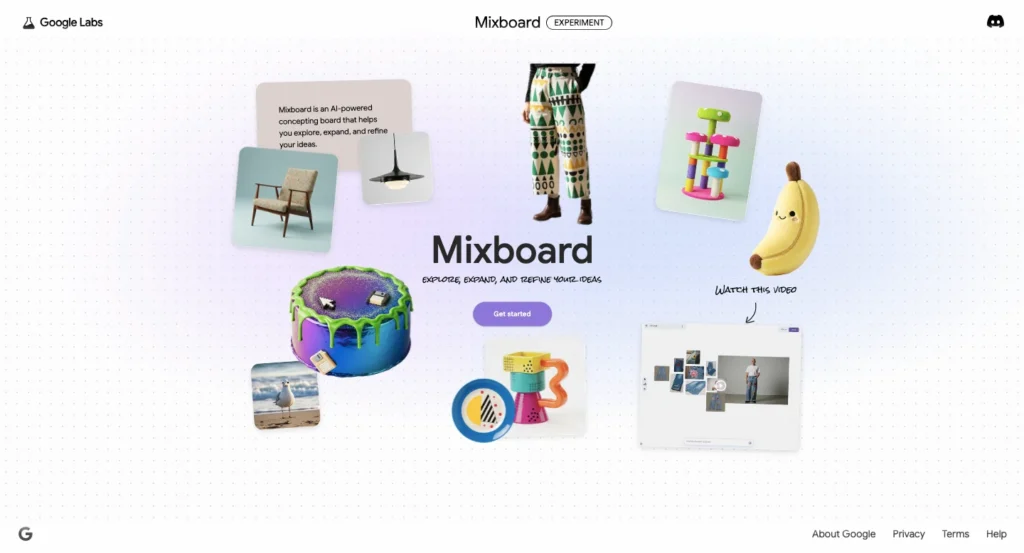
- Visit labs.google.com/mixboard
- Sign in with any Google account
- Start creating immediately, no approval process
Step-by-Step Guide: Creating Your First Mixboard
Let’s walk through a practical example: planning a product launch campaign for an eco-friendly water bottle brand.
Step 1: Start a New Project
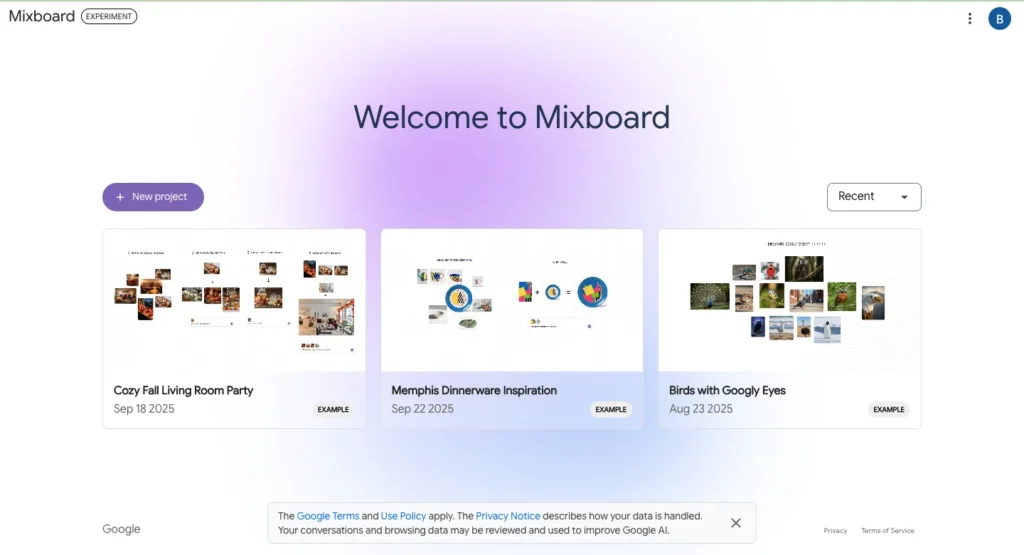
Start a new project from a text prompt or choose from pre-populated boards.
When you first open Mixboard, you see two options:
Option A: Blank Canvas
Empty workspace where you build everything from scratch
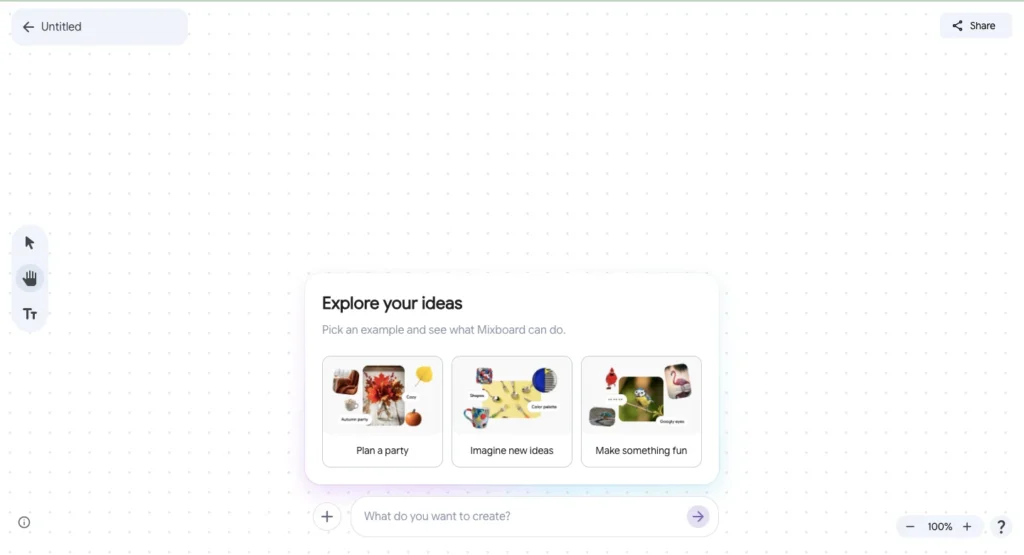
Option B: Pre-populated Templates
Example boards like “Cozy Fall Living Room,” “Event Planning,” “Product Concept Board”
For your first time, choose a template to understand the interface, then start fresh projects once comfortable.
Step 2: Enter Your Initial Prompt
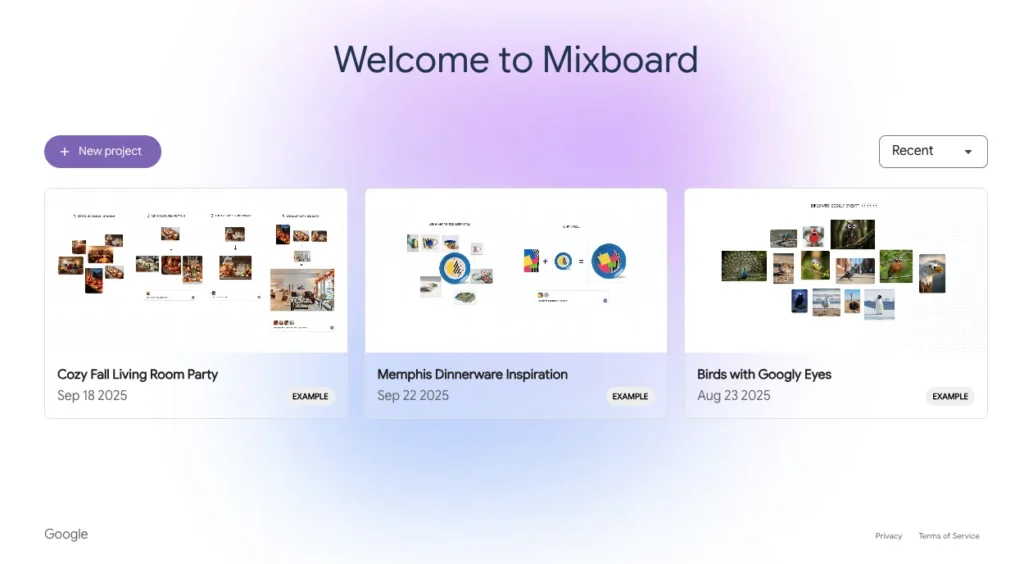
The quality of your mood board depends heavily on prompt clarity. Here’s the formula:
Weak prompt: “Water bottle launch”
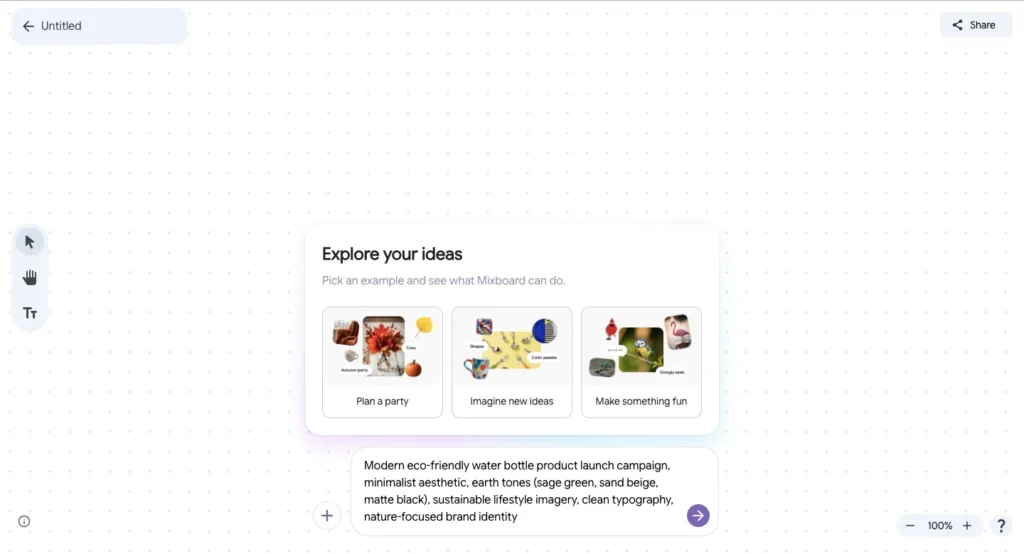
Strong prompt: “Modern eco-friendly water bottle product launch campaign, minimalist aesthetic, earth tones (sage green, sand beige, matte black), sustainable lifestyle imagery, clean typography, nature-focused brand identity”
What makes a strong prompt:
- Specific product/concept
- Defined aesthetic direction
- Color palette guidance
- Mood/emotion descriptors
- Target audience context
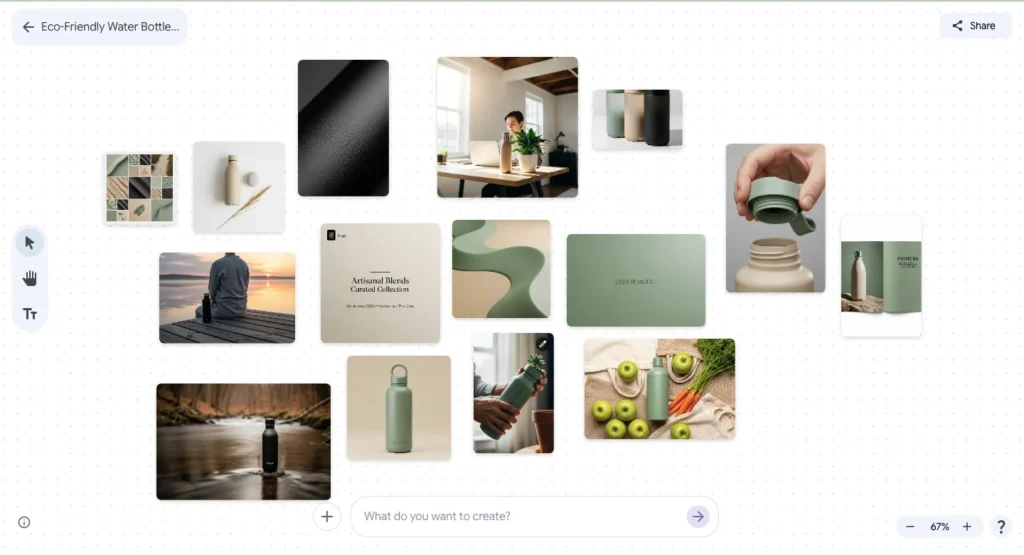
After entering your prompt, Mixboard generates 10-15 images within 15-30 seconds, arranged across an infinite canvas.
Step 3: Navigate the Canvas
Mixboard uses an infinite canvas interface similar to Figma or Miro:
| Action | How to Do It | Purpose |
|---|---|---|
| Zoom In/Out | Scroll mouse wheel | View details or see entire board |
| Pan Canvas | Hold Spacebar + Click & Drag | Move around workspace |
| Select Image | Single click | Highlight for editing or moving |
| Move Image | Click & Drag | Rearrange board layout |
| Multi-Select | Shift + Click multiple images | Group edits or combinations |
Step 4: Refine Generated Images
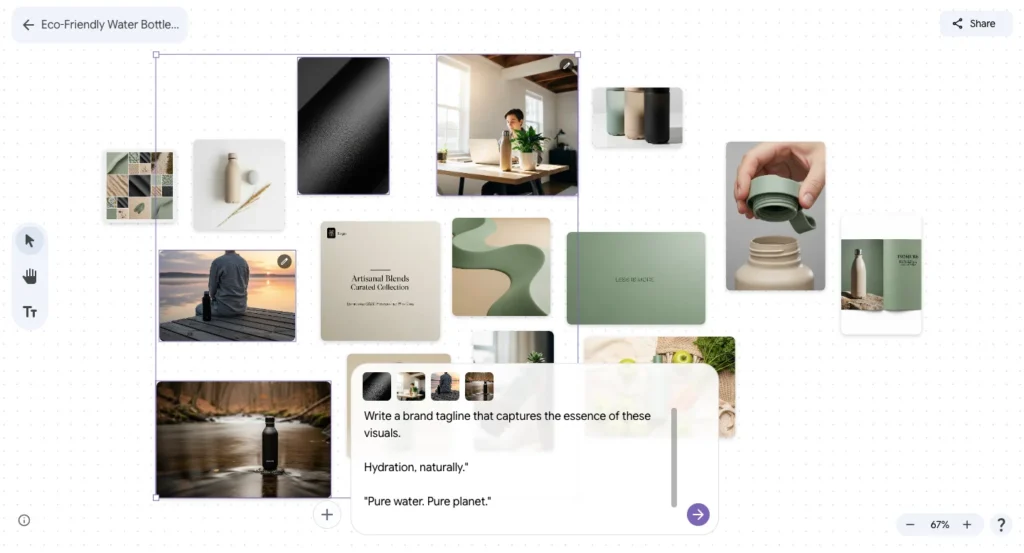
Click any image to reveal editing options:
- Regenerate: Creates a completely new image following the same concept
- More Like This: Generates variations of that specific image style
- Remove Background: Isolates subject for product mockups or combinations
- Edit with Prompt: Modify using natural language (“make this darker,” “add autumn leaves”)
- Duplicate: Create a copy before experimenting with edits
- Delete: Remove from board
Step 5: Combine Images for Mockups
Here’s where Mixboard becomes powerful for practical work:
Scenario: You want to place your logo on the water bottle.
- Generate your logo separately
- Upload a photograph of a blank water bottle OR generate one
- Select both the logo image and bottle image (Shift + Click)
- Type command: “Place the clover logo on the water bottle as a high-quality printed design”
- Nano Banana combines them, adjusting for perspective, lighting, and surface texture
Highlight elements and prompt changes like “add more autumn vibes” or “combine these images.”
This eliminates the need for Photoshop or professional mockup tools for early-stage concepts.
Step 6: Generate Supporting Text and Concepts
Mixboard doesn’t just create images, it can generate accompanying text based on your visuals:
How it works:
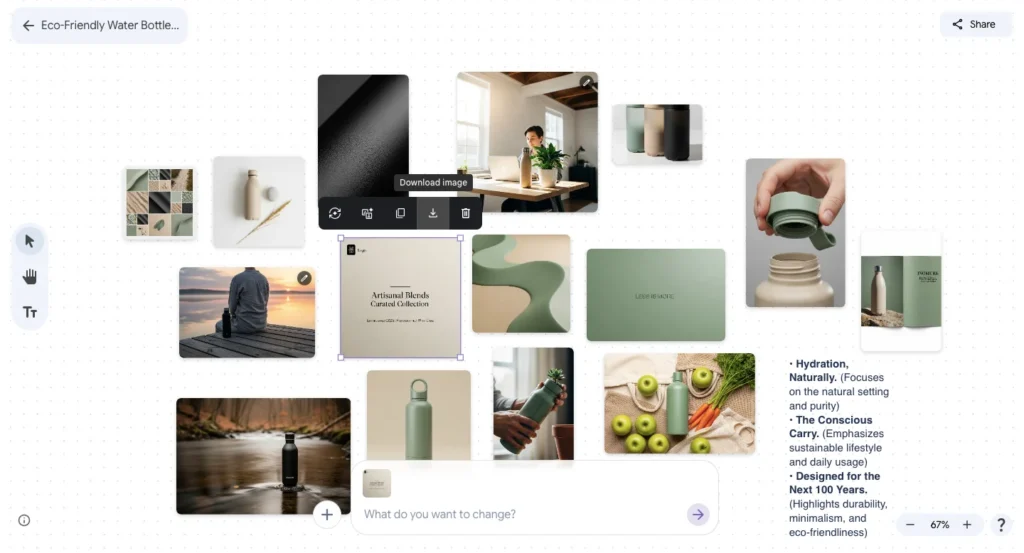
Select multiple images on your board, then type: “Write a brand tagline that captures the essence of these visuals.”
Mixboard analyzes the visual mood, style, and themes, then generates text options matching that aesthetic.
Example output:
For the eco-friendly water bottle board, Mixboard might suggest:
- “Hydration, naturally.”
- “Pure water. Pure planet.”
- “Drink consciously.”
You can regenerate text options until you find messaging that resonates.
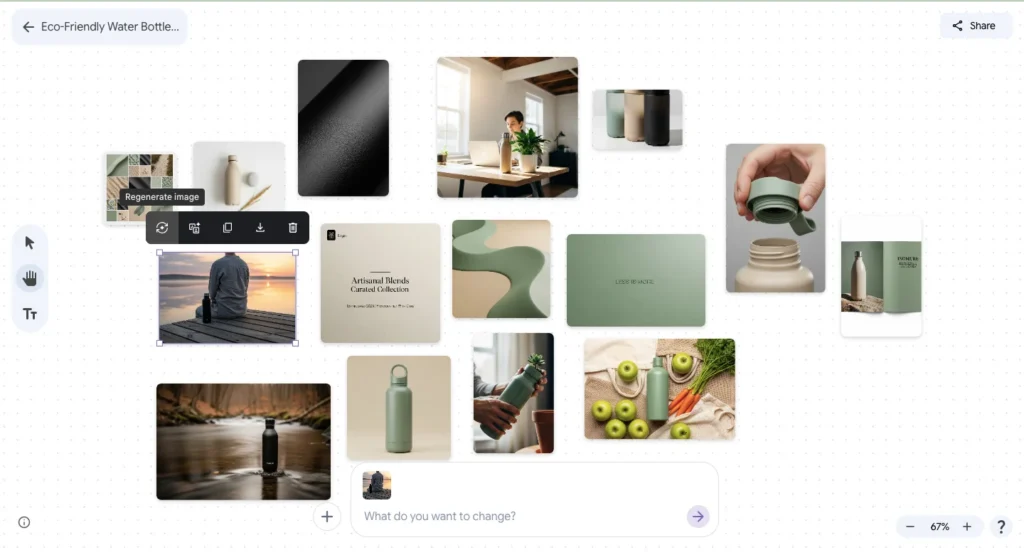
Step 7: Save and Share Your Board
When you are ready to share your work, click the ‘Share’ button to create a unique link that you can send to others.
Sharing options:
- Public link: Anyone with the link can view (read-only)
- Download images: Export individual images or entire board as PNG files
- Export to PDF: Create presentation-ready deck (coming soon)
Current limitations:
Mixboard doesn’t support:
- Real-time collaboration (like Figma)
- Comments or annotations
- Version history
- Direct export to other Google services
You must download assets manually and import them into presentations, design tools, or social media platforms.
15 Practical Use Cases for Google Mixboard
Let’s get specific about how different professionals actually use Mixboard:
1. Product Design Concepting
Scenario: A startup developing smart home devices needs to visualize their first product before investing in prototypes.
Mixboard workflow:
- Prompt: “Modern smart home thermostat, minimalist design, circular interface with subtle LED indicators, matte finish in charcoal gray and brushed aluminum, installed on modern wall”
- Generate multiple design variations
- Combine with interior settings to see in context
- Share with investors for pre-development funding approval
Value: Avoid expensive physical prototyping until design direction is validated.
2. Wedding Planning Aesthetics
Scenario: A couple planning a fall wedding struggles to communicate their vision to the venue and florist.
Mixboard workflow:
- Prompt: “Rustic autumn wedding aesthetic, outdoor barn venue with string lights, burnt orange and burgundy color palette, wooden tables with seasonal floral centerpieces, cozy candlelit atmosphere”
- Generate ceremony, reception, and detail shots
- Share board with all vendors for aligned vision
- Use as reference for dress, décor, and photography style
Value: Eliminate miscommunication that leads to wedding-day disappointments.
3. Social Media Campaign Planning
Scenario: A marketing team needs visual direction for a month-long Instagram campaign.
Mixboard workflow:
- Prompt: “Modern fitness brand Instagram feed aesthetic, high-energy workout photography, motivational quote graphics, bold gradient backgrounds in electric blue and neon orange, consistent minimal typography”
- Generate 20-30 concept images
- Arrange into weekly themes
- Brief photographer and graphic designer using board as reference
- Maintain visual consistency across entire campaign
Value: Ensure cohesive brand presence across 30+ posts without ad-hoc creation.
4. Interior Design Client Presentations
Scenario: An interior designer pitching a bedroom redesign to clients who can’t visualize concepts from descriptions.
Mixboard workflow:
- Prompt: “Scandinavian bedroom design, light wood flooring, linen bedding in soft gray and white, floor-to-ceiling windows with sheer curtains, minimal artwork, indoor plants in ceramic pots, natural morning light”
- Generate multiple angle variations
- Show furniture arrangement options
- Present color and material alternatives
- Get client buy-in before purchasing anything
Value: Reduce revision cycles and returns from mismatched expectations.
5. Fashion Lookbook Development
Scenario: A fashion brand launching a summer collection needs a cohesive lookbook concept.
Mixboard workflow:
- Prompt: “Summer fashion lookbook aesthetic, minimalist streetwear in neutral tones, oversized linen shirts and wide-leg pants, models in urban settings with natural light, concrete textures, casual confident poses”
- Generate outfit concepts
- Establish photography style and locations
- Brief photographers and stylists
- Ensure consistent brand identity across collection
Value: Clear creative direction reduces photoshoot production costs and time.
6. Restaurant Menu Design Inspiration
Scenario: A new restaurant needs menu design that matches their modern farm-to-table concept.
Mixboard workflow:
- Prompt: “Farm-to-table restaurant menu design, rustic minimalist aesthetic, kraft paper texture, hand-drawn botanical illustrations, elegant serif typography, earthy color palette with sage green accents”
- Generate layout variations
- Test different typography styles
- Visualize how menu integrates with restaurant interior
- Share with graphic designer for final production
Value: Avoid costly reprints from unclear design direction.
7. YouTube Thumbnail Concepts
Scenario: A content creator wants consistent thumbnail aesthetics across video series.
Mixboard workflow:
- Prompt: “YouTube tech review thumbnail style, bold sans-serif text overlay, product photography on gradient backgrounds, consistent color scheme of electric blue and white, high-contrast dramatic lighting”
- Generate thumbnail templates
- Test different text placements
- Establish visual brand for channel
- Create repeatable formula for future videos
Value: Professional channel identity without hiring designers for every video.
8. Book Cover Concepting
Scenario: An author self-publishing needs cover design options to test with potential readers.
Mixboard workflow:
- Prompt: “Psychological thriller book cover, dark moody atmosphere, silhouette of woman in foggy forest, muted teal and charcoal color palette, minimalist typography with serif title font”
- Generate multiple cover concepts
- Test different mood and genre signals
- Poll target audience on favorite direction
- Brief cover designer with validated concept
Value: Ensure cover design resonates with target readers before publication.
9. App UI Mood Exploration
Scenario: A UX team designing a meditation app needs visual direction before wireframing.
Mixboard workflow:
- Prompt: “Meditation app interface aesthetic, calming minimalist design, soft gradients in lavender and pale blue, rounded UI elements, subtle nature-inspired iconography, serene spacious layouts”
- Generate screen concepts
- Establish color scheme and visual language
- Brief UI designers with clear aesthetic direction
- Maintain consistency across all app screens
Value: Aligned team vision prevents design conflicts during development.
10. Brand Identity Exploration
Scenario: A startup founder needs to visualize brand identity before hiring a designer.
Mixboard workflow:
- Prompt: “Sustainable skincare brand identity, natural organic aesthetic, earthy tones of clay beige and sage green, minimal hand-drawn logo concepts, apothecary-style packaging, warm inviting atmosphere”
- Generate logo variations
- Explore packaging concepts
- Test color palettes
- Create comprehensive brand mood board
- Share with designer as creative brief
Value: Founder can articulate vision clearly, reducing designer revision cycles.
11. Photography Shoot Planning
Scenario: A commercial photographer preparing for a product shoot needs to communicate creative vision to the client.
Mixboard workflow:
- Prompt: “Product photography setup for luxury watches, dramatic side lighting with deep shadows, black background, reflective surface underneath, minimal composition, high-end commercial aesthetic”
- Generate lighting reference images
- Show composition options
- Establish mood and style expectations
- Get client approval before shoot day
- Use as on-set reference for lighting setup
Value: Eliminate on-set creative disagreements and reshoots.
12. Event Branding and Signage
Scenario: A conference organizer needs cohesive branding across banners, badges, and digital displays.
Mixboard workflow:
- Prompt: “Tech conference branding aesthetic, modern geometric patterns, bold gradient from deep purple to electric cyan, clean sans-serif typography, futuristic professional vibe, signage and badge designs”
- Generate banner concepts
- Design badge layouts
- Create stage backdrop visualizations
- Ensure visual consistency across all touchpoints
Value: Professional event identity without hiring full branding agency.
13. Real Estate Property Staging Concepts
Scenario: A realtor wants to show buyers how an empty property could look when furnished.
Mixboard workflow:
- Prompt: “Modern living room staging for urban apartment, gray sectional sofa, glass coffee table, minimal wall art, floor lamp with warm lighting, neutral color palette, professional real estate photography style”
- Generate furnished room concepts
- Show multiple style options (modern, traditional, eclectic)
- Help buyers visualize potential
- Support higher sale price through visualization
Value: Sell properties faster by helping buyers overcome “blank room” visualization challenges.
14. Podcast Branding and Cover Art
Scenario: A podcaster launching a true crime series needs compelling cover art and branding.
Mixboard workflow:
- Prompt: “True crime podcast cover art, dark mysterious aesthetic, vintage detective noir style, muted crimson and charcoal color palette, bold typography with slightly distressed texture, microphone iconography”
- Generate cover art concepts
- Test different genre signals
- Establish consistent episode artwork style
- Create social media branding templates
Value: Professional podcast identity increases listener trust and subscriptions.
15. Classroom Presentation Visual Themes
Scenario: A teacher creating an engaging presentation on ancient civilizations for middle school students.
Mixboard workflow:
- Prompt: “Educational presentation theme on ancient Egypt, hieroglyphic decorative elements, sandy beige and gold color palette, student-friendly visual style, clear sans-serif text on papyrus-textured backgrounds”
- Generate slide background options
- Create consistent visual theme
- Add educational infographic concepts
- Make learning visually engaging
Value: Increase student engagement through visually cohesive, professional presentations.
Is Google Mixboard Worth Using? The Honest Assessment
Strengths:
- Fastest ideation tool for visual concepts
- Completely free during beta
- No design skills required
- Nano Banana image quality is impressive
- Perfect for early-stage concepting and client alignment
- Eliminates hours of Pinterest scrolling
Limitations:
- No real-time collaboration
- Limited export options
- Experimental status means features may change or disappear
- Not suitable for final production assets
- Inconsistent results with vague prompts
For visual ideation speed, Mixboard is unmatched. It compresses 3-8 hours of manual moodboard creation into 15-30 minutes of AI-assisted generation.
If you’re in the creative field, it’s worth 30 minutes to explore.
Just remember: it’s an experimental tool. Use it for exploration and concepting, not as mission-critical infrastructure.
Also Read: